IPHub is a service that tells you whether your IP is a normal home connection or a proxy/VPN/server. It returns a single number: 0 for a normal connection, 1 for a server/VPN/proxy, and 2 for "suspicious, lower confidence".
If a server just kicked you for using a VPN when you weren't, then IPHub could be to blame. Below is what each block value means, why real users get blocked, how to check any IP, and how proxies score.
Jump to: I got flagged · I'm adding IPHub to my app · I use proxies
Quick Answer
| At a glance | IPHub |
|---|---|
| Website | iphub.info, running since 2014 |
| Detects | Proxies, VPNs, Tor, hosting and datacenter IPs |
| Returns | block 0, 1 or 2, plus country, ISP and ASN |
| Used by | Game servers, online shops, sign-up and login forms |
| Free plan | 1,000 lookups a day with an API key |
| Residential proxy detection | Paid Professional plan |
What Block 0, 1, and 2 Mean
| Block | IPHub's own description | What sites usually do |
|---|---|---|
| 0 | Residential or business IP (i.e. safe) | Let it in |
| 1 | Non-residential IP (hosting provider, proxy, etc.) | Block or challenge |
| 2 | Suspicious IP, lower confidence (may flag innocent users) | Log it or add a light check |
The docs recommend blocking only on block 1. Most of that judgment depends on who owns the IP. Every IP belongs to a network, and if that network sells servers or VPNs, the IP is very unlikely to be a person at home.
What the Other Fields Tell You
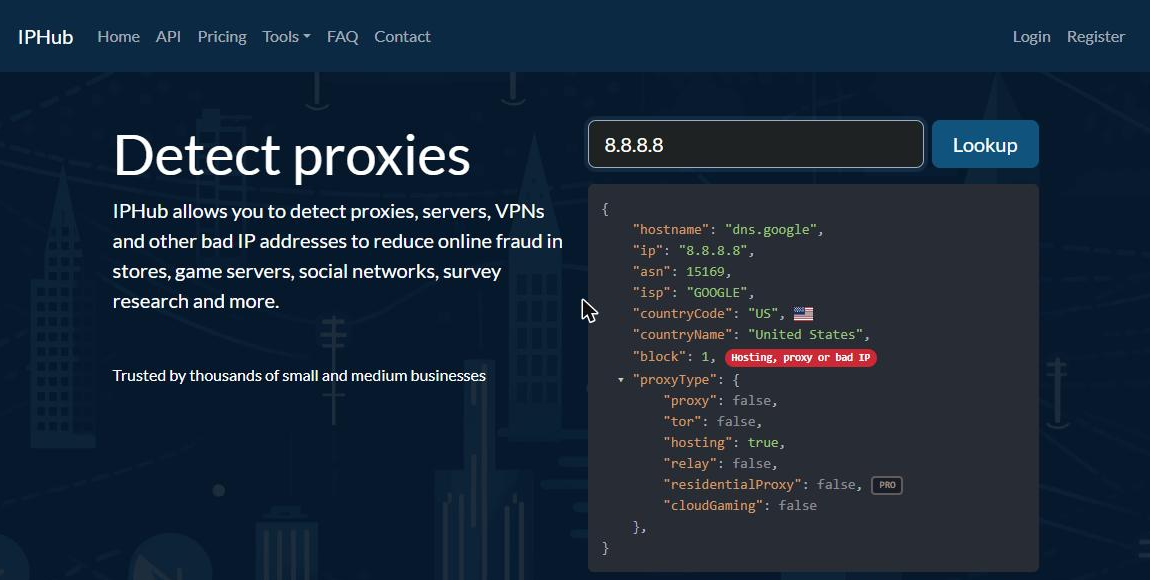
The screenshot above shows every field a lookup returns:
hostnameis the name that the IP points back to; in this case,dns.google. Server IPs often have rather descriptive names and home IPs generally don't.asnandispname the network that owns the IP. ASN 15169 is Google's.countryCodeandcountryNameare the details of where the IP is registered (not necessarily where the person actually is).proxyTypebreaks the verdict down intoproxy,tor,hosting,relay,residentialProxy, andcloudGaming.hosting: trueis why Google's block 1 is triggered.
The residentialProxy field has a PRO tag. It's visible on the website in every lookup, but the API requires the paid Professional plan.
Block 1 vs. Block 2
Block 1 means IPHub classifies the network as hosting, VPN, or proxy, so the IP is very unlikely to be a person at home. Block 2 is less certain. IPHub says it can flag innocent users, and its residential proxy flag will apply to normal home and mobile IPs, as you'll see below.
A site that kicks on block 2 will kick real people. If you're running a site or a server, then block 2 is a reason to look a bit closer rather than a reason to ban.
Why IPHub Flagged You
Here's a real lookup of a user's own mobile IP on MTN Nigeria (ASN 29465, listed as VCG-AS) carried out with absolutely no VPN or proxy in use:
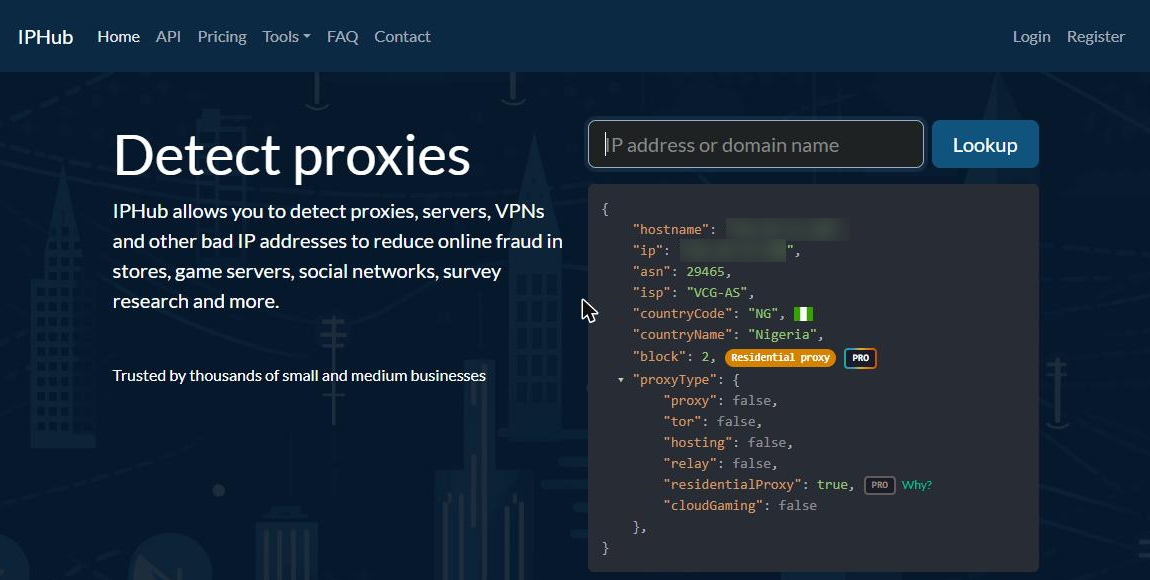
residentialProxy: true, even though the user wasn't actually running a proxy.Clicking Why? on iphub.info explains it. IPHub will only flag an IP as a residential proxy if it has actually seen that IP in a residential proxy network. With a shared or reused IP that can happen completely irrespective of you.
- An app on your network is sharing your connection. Free VPNs, "make money from your internet" apps and apps that come bundled in free games or smart TVs can turn your connection into a proxy exit for strangers.
- Someone had your IP before you. The providers are constantly reassigning dynamic IPs.
- You share the IP with other customers. Mobile carriers and many home providers will have numerous users behind a single public IP (CGNAT). One of those users running a proxy app is sufficient to cause the IP to be flagged for all the others on it.
If IPHub Says Block 1
Block 1 is rarely a mix-up. Check these first:
- A VPN or proxy is on. Check your VPN app, your browser's proxy extensions, and your system proxy settings.
- You're on a work/school/hotel network which sends the traffic out via a data center. Try your own mobile data.
- A "privacy" feature in your browser or phone is routing you through a relay.
Just turn it off, check your IP again on iphub.info, and you should see block 0 or 2.
How to Get Past It
- Switch networks. Either use mobile data rather than Wi-Fi or vice versa and you'll get a different IP.
- Remove the bandwidth sharing and free VPN apps from your phones, your computers, and your TV.
- Restart your router if your provider assigns you a new IP on reconnect. On CGNAT, that won't get you your own IP.
- Wait. If the proxy activity stops, IPHub says the flag fades as the observations age.
- Ask the server admin to allow you. They went with IPHub and they can make the exception.
- If it looks like a one-off then get in touch with IPHub support with your IP. They won't clear an IP that keeps showing up in proxy networks.
How to Check an IP
Paste an IP into the box on iphub.info or leave it blank if you want to check your own. Guest lookups are limited per day and you'll probably have to go through a quick "verify you're human" check. For anything automated, use the API below.
Using the IPHub API
Register, verify your email, and claim the free key. Then:
curl -s "https://v2.api.iphub.info/ip/8.8.8.8" -H "X-Key: YOUR_API_KEY"
The response has the same fields as the website. To also get the blockReason and the proxyType breakdown, add -H "Accept-Version: 2.2".
IPHub's guidance comes down to a few rules:
- Decide on
blocknot onproxyType. TheproxyTypefields don't cover every reason an IP might be flagged. - Block on 1, go easy on 2. Log block 2 or add a CAPTCHA or email check.
- Match the response to the risk. Log on browsing, challenge on logins, review on payments.
- Use a 5 second timeout and retry once on connection errors and 5xx replies. A
429means you've hit your limit. - Cache, but briefly. Up to 24 hours on Basic; IPHub suggests about a minute for residential proxy results.
import time
import requests

API_KEY = "YOUR_API_KEY"
CACHE_SECONDS = 60  # short, as IPHub advises for residential proxy results
_cache = {}

def iphub_block(ip):
    hit = _cache.get(ip)
    if hit and time.time() - hit[1] < CACHE_SECONDS:
        return hit[0]
    url = f"https://v2.api.iphub.info/ip/{ip}"
    for attempt in range(2):
        try:
            resp = requests.get(url, headers={"X-Key": API_KEY}, timeout=5)
        except requests.RequestException:
            time.sleep(0.2)  # connection problem: retry once
            continue
        if resp.status_code >= 500:
            time.sleep(0.2)  # IPHub error: retry once
            continue
        if resp.status_code != 200:
            return None  # e.g. 429 rate limit or a bad key
        block = resp.json()["block"]
        _cache[ip] = (block, time.time())
        return block
    return None  # lookup failed: don't block on it

def decide(ip):
    block = iphub_block(ip)
    if block == 1:
        return "challenge or deny"
    if block == 2:
        return "allow, but log it"
    return "allow"
If IPHub can't be reached, decide just lets the visitor through. An outage on IPHub's end shouldn't in any way lock out your actual users.
On a Game Server
Many anti-VPN plugins run on IPHub. The open source AntiVPN plugin for Minecraft is a case in point, taking an IPHub key in its config. Set it to kick on block 1 only, cache the results for up to 24 hours, and keep an allow list of people who get kicked by mistake. With the free key that's about 1,000 different players a day.
How IPHub Sees Proxies
| Proxy type | Where the IP comes from | What IPHub usually sees |
|---|---|---|
| Datacenter proxy | A hosting company | Block 1, hosting |
| Commercial VPN | The VPN's servers | Block 1 |
| P2P residential proxy | Strangers' home devices | Flagged on the Professional plan once seen in a proxy network |
| Dedicated mobile proxy | A SIM on a mobile carrier | A carrier ASN, but shared carrier IPs can carry flags from other users |
As the MTN lookup shows, a carrier IP is shared with loads of people, so it can easily pick up a residential proxy flag from someone else on that same address. That's why you need to check the exact exit IP that your proxy gives you each time.
import requests

PROXY = "http://USERNAME:PASSWORD@gb1.pxm2.io:PORT"
proxies = {"http": PROXY, "https": PROXY}

exit_ip = requests.get("https://api.ipify.org", proxies=proxies, timeout=20).text
result = requests.get(
    f"https://v2.api.iphub.info/ip/{exit_ip}",
    headers={"X-Key": "YOUR_API_KEY"},
    timeout=5,
).json()
print(exit_ip, result["isp"], "block", result["block"])
Block 0 = you're clear. Block 1 or 2 = rotate to a fresh IP prior to starting. Whatever IPHub says, you have to abide by the terms of the sites you're visiting.
IPHub isn't the only checker out there. Other sites use proxycheck.io, IPQualityScore, IPinfo and GetIPIntel, and their data is different. Test against the one that your target is using.
FAQ
What is IPHub?
A service at iphub.info which tells you whether an IP is a normal connection or a server, VPN, proxy or Tor exit.
Is IPHub free?
Up to 1,000 lookups a day once you've registered and verified your email. Any additional lookups and residential proxy detection will incur a cost.
What does block 1 mean on IPHub?
A non-residential IP (i.e. a server, a VPN or a proxy). That's the value IPHub recommends you act on.
Why does IPHub say I'm a proxy when I'm not?
Your IP was seen in a proxy network (typically through an app on your network, a previous owner of the IP or another customer sharing it with you).
How do I get my IP unflagged?
Remove the bandwidth sharing apps, switch networks and just wait for the flag to fade. For a one-off, get in touch with IPHub support with your IP.
Does IPHub detect VPNs?
Yes. Commercial VPNs run on servers in data centers, so their IPs usually come back as block 1. A VPN running on someone's home connection is harder to catch, and that's where the residential proxy check comes in.
Check Our Exit IPs Before You Buy
pxm2.io runs dedicated 4G and 5G mobile proxies on real SIM cards with carriers such as O2 in the UK, with locations in the US, France, Spain, Singapore, India, and Poland. Ask support for a free 1-hour trial, run the exit-IP check above, and see the block values for yourself. View plans →
Sources: IPHub, IPHub: Why is my IP a residential proxy?, IPHub API, IPHub JSON keys, IPHub pricing, IPHub best practices