You open a site you've used a hundred times and get Error 1005: Access denied. What happened?
The page says the site owner has banned the network your connection comes from and shows that network's number. You're not blocked as a person, and usually not even as a single IP. You're blocked because of the network your IP belongs to.
Error 1005 means the site owner has banned the entire network your IP address belongs to, identified by its ASN. Cloudflare returns an HTTP 403, and the ban stays in place until the site owner removes the rule.
Here's how to find your ASN with curl, why networks get banned, and how to get past Cloudflare error 1005.
Jump to your situation: I'm just browsing · I run scripts · I own the site
Quick Answer
| At a glance | Error 1005 |
|---|---|
| HTTP status | 403 Forbidden |
| How long it lasts | Until the owner removes the rule. Waiting makes no difference |
| Typical cause | Your IP sits in a cloud, hosting, or VPN network that the site blocks |
| The fix | Connect from a different network: mobile data, another Wi-Fi, or a clean mobile proxy |
What Error 1005 Means
Every public IP address belongs to a network run by an organization such as an ISP, a mobile carrier, a cloud company, or a VPN provider. That network has an ASN (Autonomous System Number). Think of that as the postal code of your connection.
When a site owner bans an ASN in Cloudflare through an IP Access Rule, all the IPs in that ASN get blocked at the same time.
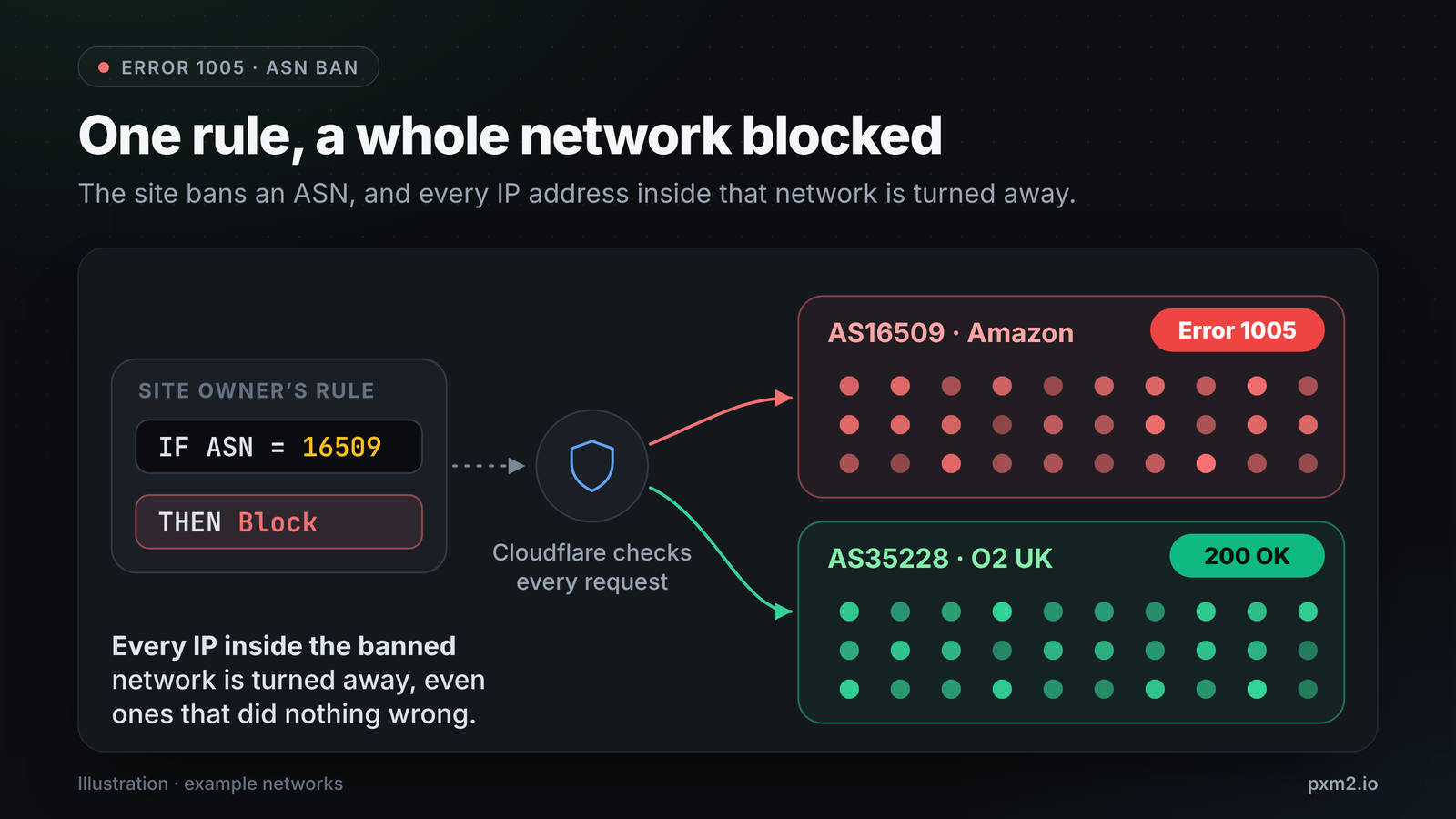
That's the key difference from error 1015, which is a temporary rate limit. A 1005 ban has no timer, so waiting won't help. You need to connect from a different network.
Why Your Network Might Be Banned
Owners rarely ban networks at random. The usual reasons:
- It's a datacenter or cloud network. Real visitors come from homes and phones, not from servers. Many sites block cloud providers such as AWS, Google Cloud, DigitalOcean, OVH, and Hetzner because that's where many bots come from.
- It's a VPN or a hosting company. VPN exit nodes are typically in a datacenter and share that datacenter's reputation.
- The network has sent abuse. If a network has been the source of an attack or spam, the owner may ban the whole ASN rather than individual IPs.
- Regional or business reasons. Some owners block networks in regions they don't serve.
On a normal home or mobile connection and still blocked? That's rare. Your provider may have been caught up in a wide ban.
Check Your ASN With curl
The quickest way to see which network a site sees is:
curl -s https://ipinfo.io/json | grep '"org"'
"org": "AS16509 Amazon.com, Inc.",
Example output. The org field shows the ASN (16509) and its owner (Amazon), so it's a cloud server. A hosting company or VPN brand in that field is a strong indicator of why you're being blocked.
Now confirm the block itself. These commands work in any Unix-style shell, including macOS, Linux, Windows with WSL, or Git Bash.
URL="https://your-site.example/"
curl -s -o /dev/null -w "%{http_code}\n" "$URL"
curl -s -o /dev/null -D - "$URL" | grep -iE "^(server|cf-ray)"
curl -s "$URL" | grep -o "1005" | head -1
A 403 with 1005 on the page is an ASN ban. A 403 without 1005 is a different kind of block, such as 1020. The ASN on the error page should normally match the one in your org field. Save the cf-ray value, since the site owner will need it to track your request.
How to Fix Error 1005 as a Visitor
The ban is on the network, so the fix is to connect from a different one:
- Turn off your VPN. That often fixes it because VPN servers tend to be in datacenter networks that the site has banned.
- Switch to mobile data. Your phone will be on your carrier's network, which will be a different ASN from your home or office provider.
- Try a different Wi-Fi network. A different provider means a different ASN.
- Contact the site owner. Send a screenshot with the Ray ID and the time, ideally in UTC. Only the site owner can lift the ban.
On a work or school network? Many organizations route traffic through a corporate proxy or cloud security service, so the website sees that provider's datacenter rather than your office. If 1005 only happens at work, that's probably why. Ask your IT team, or use mobile data for that site.
Clearing your cookies or changing your DNS won't help. Cloudflare sees the IP address of your request, and DNS doesn't alter that.
How to Fix Error 1005 When You Run Scripts
If your scripts run on a cloud server, 1005 is pretty common. Your requests come from a hosting ASN, and many sites will block that.
1. Use IPs From Networks the Site Doesn't Block
You need an exit IP from a network that real customers use. In practice, that means a residential or mobile IP.
Mobile IPs are particularly difficult to ban at the ASN level. Carriers place many phones behind a small pool of shared public IPs, a setup known as carrier-grade NAT, or CGNAT. Banning the carrier's network would cut off a large share of a country's real mobile phone users, so owners rarely do it. That's why carrier networks are such a common choice for legitimate automation.
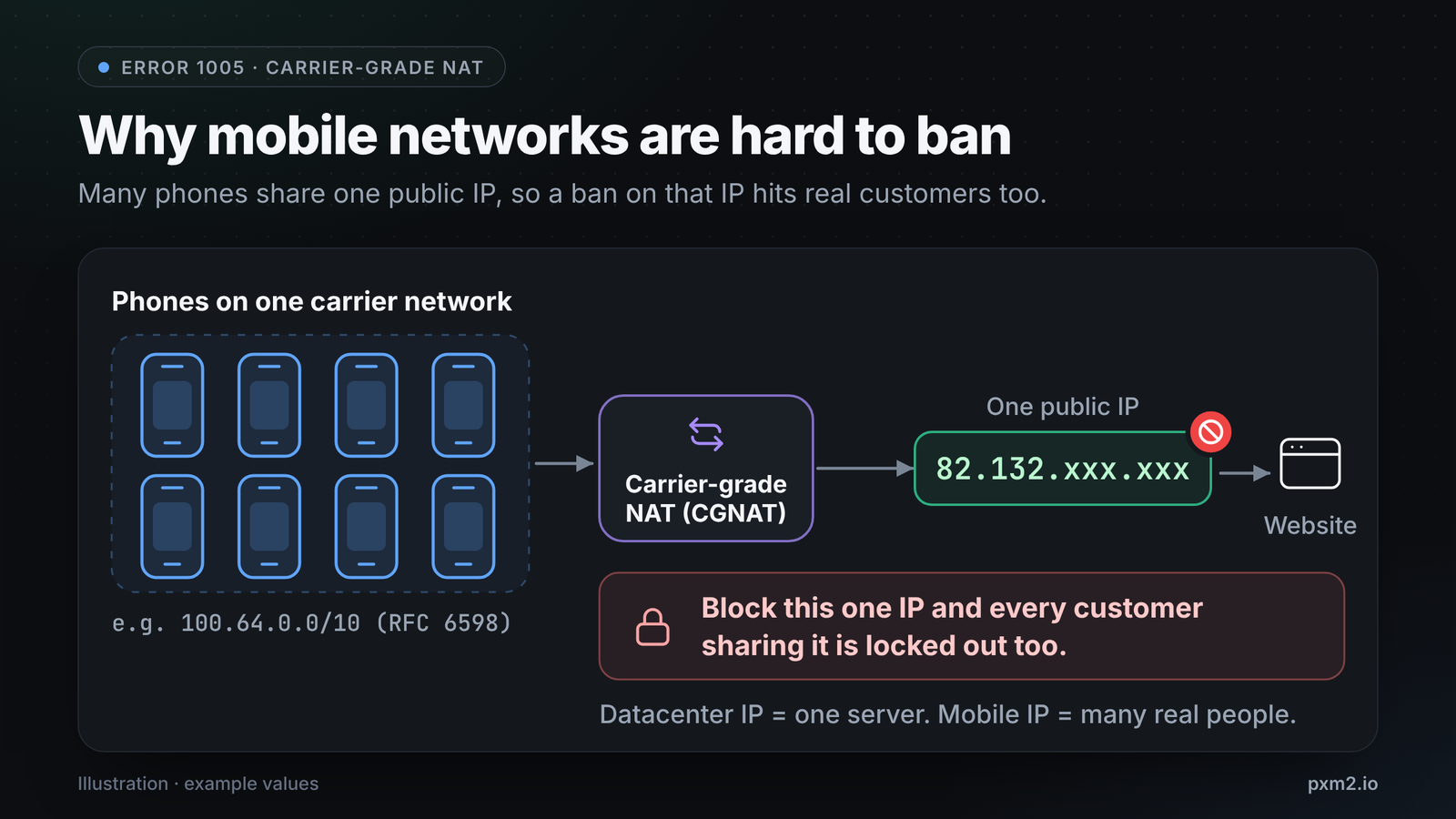
For a more complete comparison, see mobile vs residential vs datacenter proxies.
2. Test Before You Scale
Compare the org field with and without your proxy, and check which network you exit from:
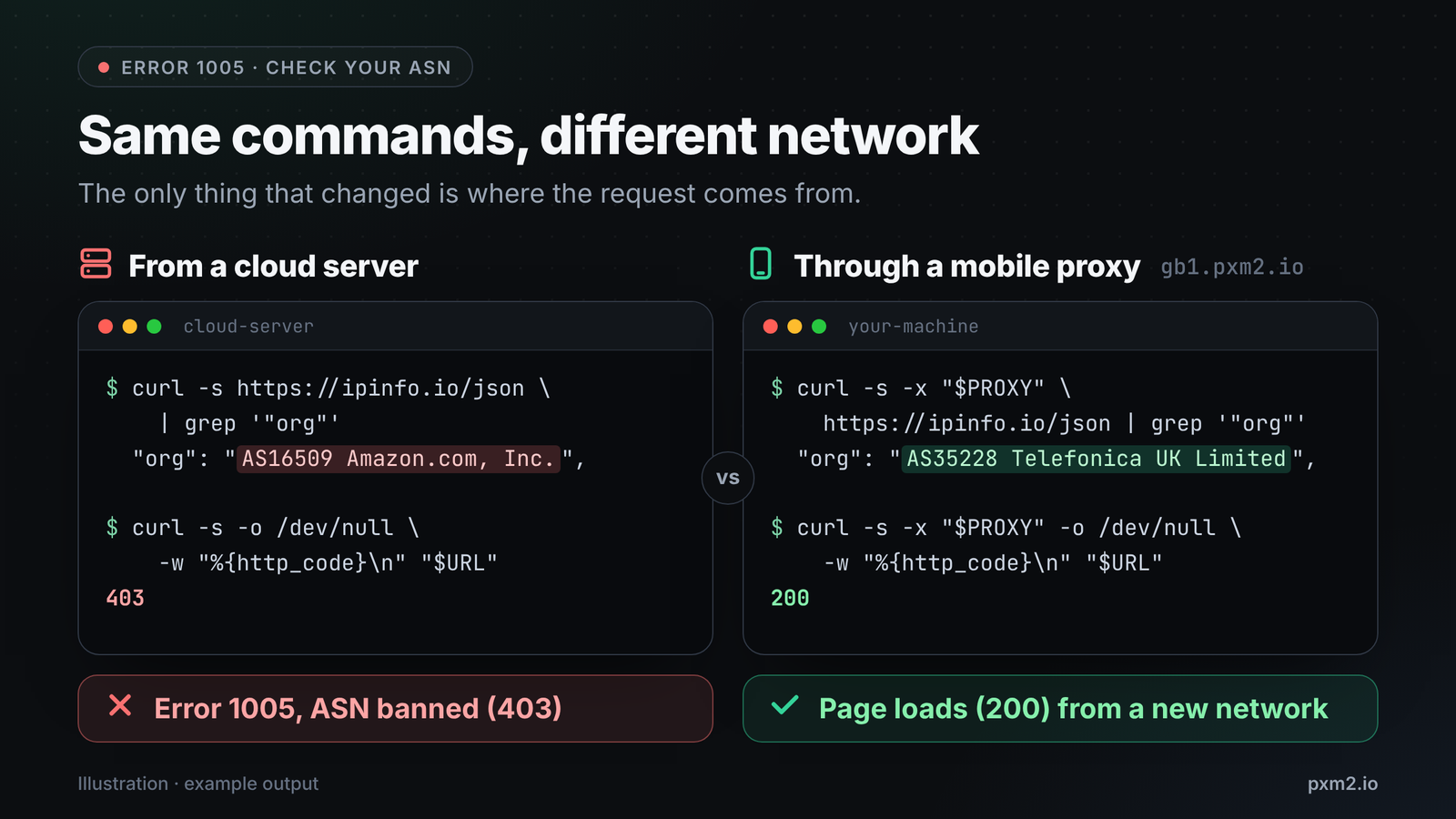
export PROXY="http://USERNAME:PASSWORD@gb1.pxm2.io:PORT"
curl -s -x "$PROXY" https://ipinfo.io/json | grep '"org"'
If it's a mobile carrier, you're on a carrier network. If it's a hosting company, you're likely to get the same 1005. Use a short Python script to check the exit network and whether the target accepts it:
import requests

PROXY = "http://USERNAME:PASSWORD@gb1.pxm2.io:PORT"
proxies = {"http": PROXY, "https": PROXY}

# Which network does the target see?
ip_info = requests.get("https://ipinfo.io/json", proxies=proxies, timeout=20)

# Does the target accept it?
page = requests.get("https://your-site.example/", proxies=proxies, timeout=20)
blocked = page.status_code == 403 and "1005" in page.text

verdict = "ASN banned" if blocked else "not a 1005 block"
print(f"Exit network: {ip_info.json().get('org')}")
print(f"Status: {page.status_code} ({verdict})")
Exit network: AS35228 Telefonica UK Limited
Status: 200 (not a 1005 block)
Example output via a UK mobile IP on O2's network.
3. Keep Your IPs Clean
A clean IP stays clean only if you don't hammer a site. Pace your requests, reuse sessions, and back off on errors, or you'll turn a 1005 into a 1015 or even an IP ban. The IP reputation and trust scores guide explains how sites score the IPs you connect from.
4. Respect the Site
An ASN ban is a conscious decision. Collect public data, abide by the site's terms and robots.txt, and don't put any load on a site that's clearly not going to allow automated traffic. If you need regular access, go to the site owner and ask for an API or permission.
How to Fix Error 1005 as a Site Owner
If real customers report 1005:
- Get the details. Ask for a screenshot with the Ray ID and the time of the error.
- Find the event. In the Cloudflare dashboard, go to Security > Events and search by Ray ID or visitor IP. Convert the UTC time of the error to your local time first.
- Check your ASN rules. Look at your IP Access Rules to see which ASN is being blocked and why.
- Narrow the block. If you've banned an entire provider to stop a few bad actors, consider banning the specific IPs, challenging the ASN rather than blocking it, or rate limiting.
- Allow the ASN if it's a legitimate network your customers use.
Error 1005 vs. Other Cloudflare Errors
| Error | What's blocked | HTTP status |
|---|---|---|
| 1005 | Your network (ASN) | 403 |
| 1006, 1007, 1008 | Your specific IP address | 403 |
| 1009 | Your country or region | 403 |
| 1010 | Your browser's signature | 403 |
| 1015 | You are being rate limited (temporary) | 429 |
FAQ
What does "ASN banned" mean?
The site owner has blocked every IP in the network you're connecting from, such as your VPN provider's network or your cloud host's network.
Why do I get error 1005 with no VPN?
Your provider's entire network could be blocked, or you could be on a work or school network routed through a datacenter. Try mobile data to test.
What's the difference between error 1005 and 1006?
1005 blocks a whole network (ASN). 1006 blocks your specific IP address, and switching to another IP on the same network can fix it. That won't fix 1005.
Is it okay to get around error 1005?
Using a different network to reach public content is normal, and most visitors do it without thinking. But if a site has clearly chosen to block automated traffic, follow its terms, and when in doubt, ask the owner for access.
Want to Test From a Real Carrier Network?
pxm2.io runs real 4G and 5G mobile proxies on carrier networks, including O2 in the UK, plus the US, France, Spain, Singapore, India, and Poland. Ask support for a free 1-hour trial and run the ASN check above on your own target before you commit. View plans →
Sources: Cloudflare Docs: Error 1005, Cloudflare Docs: 1xxx error list, Cloudflare Docs: Troubleshooting 1xxx errors, RFC 6598: Shared Address Space