Perhaps you refreshed the page too many times, your script ran too quickly, or you clicked Pay twice. Now you're seeing Error 1015: You are being rate limited.
Don't worry, this error is almost always temporary and not directed at you in any way.
Error 1015 occurs when Cloudflare's rate limit sees too many requests from your connection in a short time and blocks you (HTTP 429).
This guide explains why Cloudflare error 1015 happens, how to check with a simple curl command, and how to get unblocked and avoid it in the future.
Jump to your situation: I'm just browsing · I run scripts · I own the site
Quick Answer
| At a glance | Error 1015 |
|---|---|
| HTTP status | 429 Too Many Requests |
| How long it lasts | Until the block period ends. The site owner sets it: from 10 seconds on Free plans up to a day on Business and Enterprise plans |
| Who can lift it | Only the site owner |
| The fix | Stop retrying, wait, then slow down or spread requests across clean IPs |
What Error 1015 Means
Think of a subway turnstile that lets 50 people through every 10 seconds. The 51st person has to wait. That's how Cloudflare rate limiting works. The rules are set by the site owner, not Cloudflare, so they decide what counts as a request, how many requests are allowed, and how long you get blocked if you go over. That's why Cloudflare support can't just go in and remove a 1015 error for you.
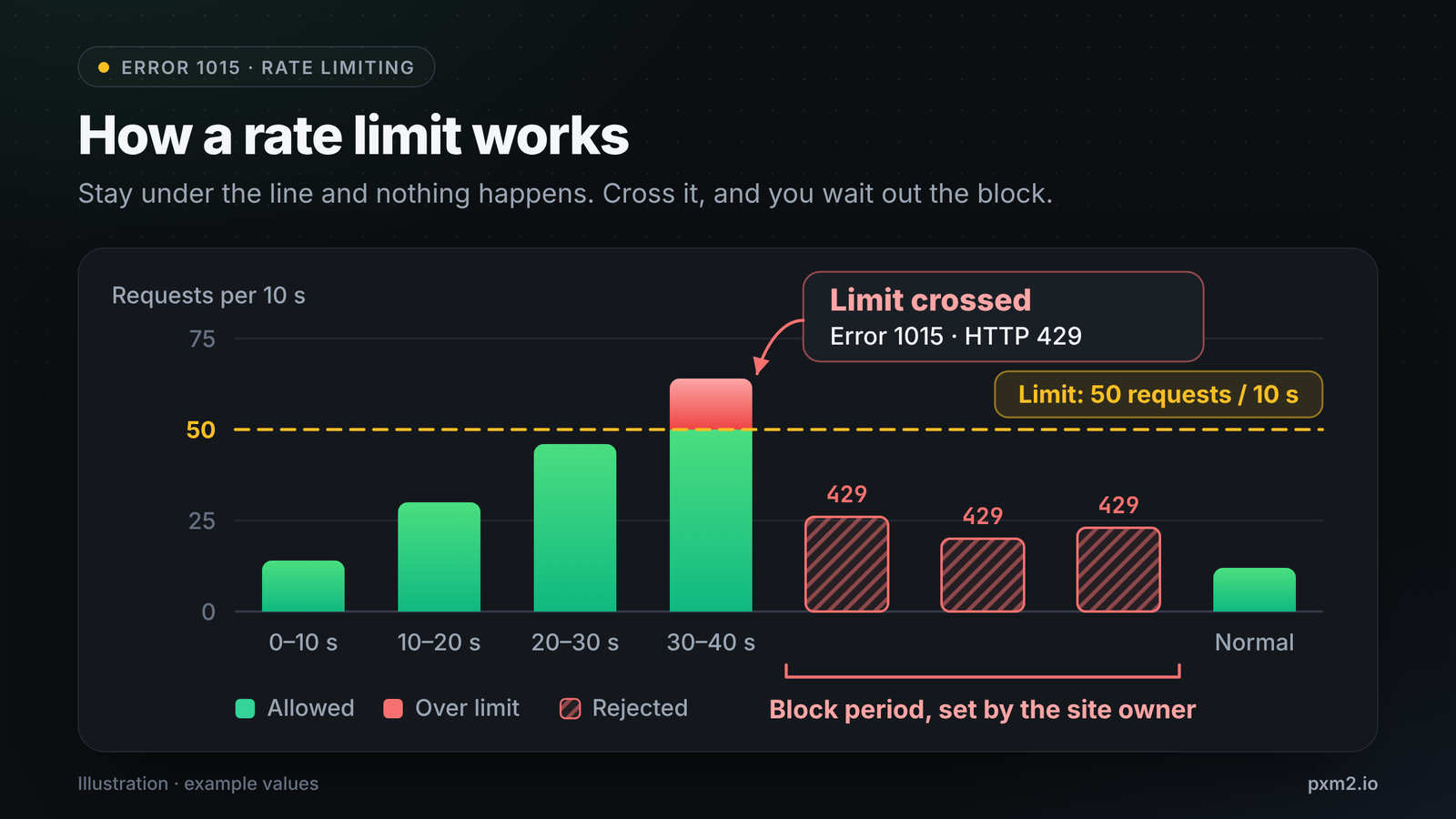
"1015" is the label Cloudflare puts on the error page. The actual HTTP status is 429. Once the block period expires, your requests will work again unless you immediately trigger the rule again.
Why You Hit Limits
Most of the time, there are four main reasons:
- Too many requests, too fast. Scrapers, price trackers, and similar tools can trigger the limit.
- A shared IP address. On office Wi-Fi, a VPN, or a busy proxy, other people's requests can count against your IP.
- A sensitive page. Owners often set tight limits on login, search, checkout, and API routes, so only a few attempts may be enough.
- Retrying while blocked. It can extend the block.
Who Counts as the Visitor?
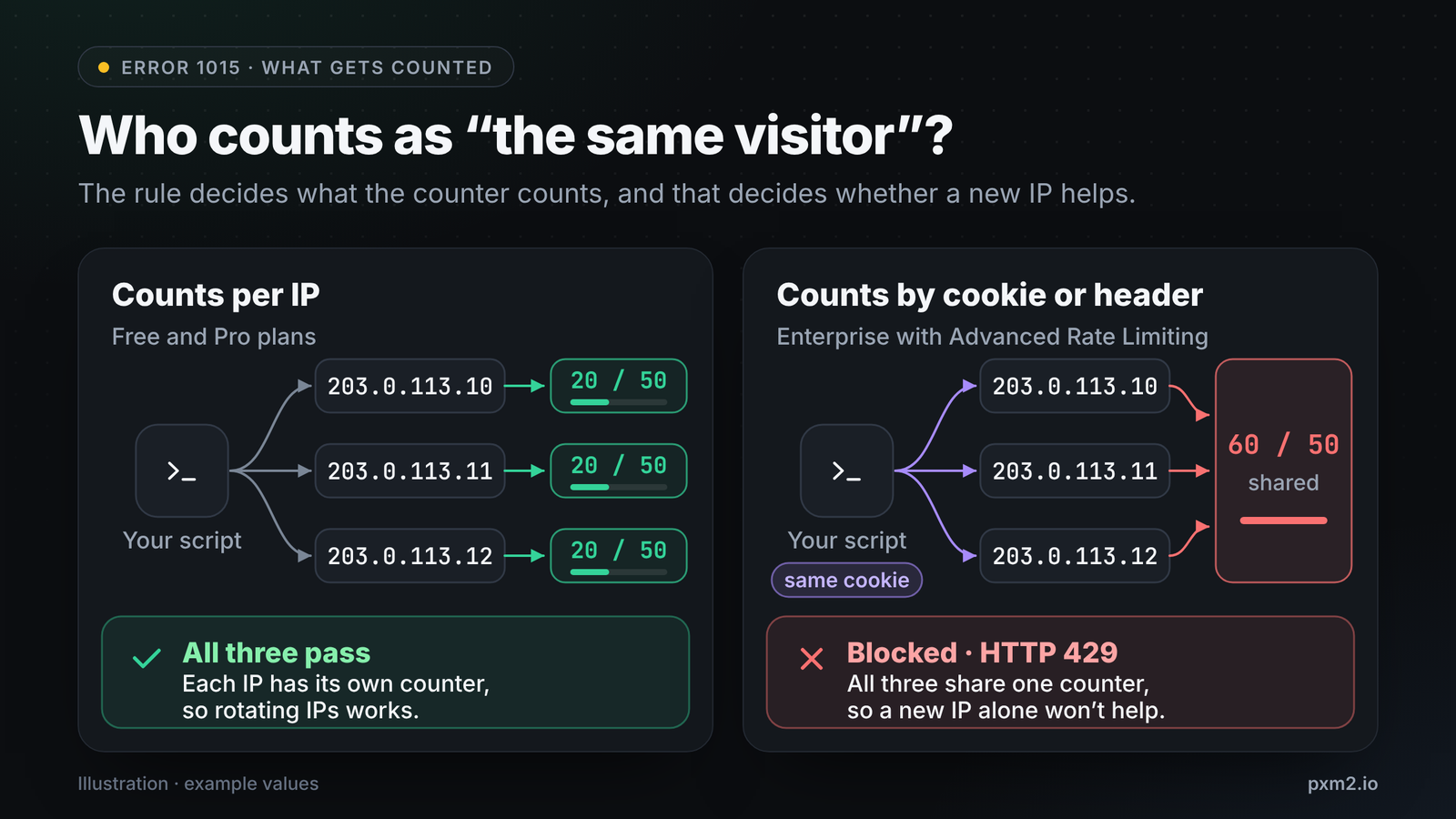
It depends on the rule and whether changing your IP will help. On the Free and Pro plans, Cloudflare counts only by IP address. Enterprise customers with Advanced Rate Limiting can count by cookie, header, country, ASN and so on (TLS fingerprints require Bot Management).
Test Error 1015 With curl
Before you do anything else, confirm what's actually happening. You can run these commands in any Unix-style shell (macOS, Linux, Windows with WSL or Git Bash, etc.). Just test sites that you own or have permission to test.
1. Check the status code
URL="https://your-site.example/"
curl -s -o /dev/null -w "%{http_code}\n" "$URL"
If you see a 429 and the 1015 page, then you've hit a rate limit. A 403 is a different block, like error 1005.
2. Read the headers
curl -s -o /dev/null -D - "$URL" \
  | grep -iE "^(HTTP|server|cf-ray|retry-after)"
HTTP/2 429
server: cloudflare
cf-ray: 8a1b2c3d4e5f6789-LHR
Example output. Save the cf-ray value (also known as the Ray ID). The site owner can use this to locate your request. If a retry-after header is present, it tells you how long to wait.
3. Find the limit threshold
for i in $(seq 1 60); do
  printf "%s " "$(curl -s -o /dev/null -w '%{http_code}' "$URL")"
done; echo
200 200 200 200 200 200 200 200 429 429 429 429 429 429
Example output, shortened. The moment 200 goes to 429 shows how many requests you're allowed in the time window. Your actual results may vary, as each site differs.
How to Fix Error 1015 as a Visitor
- Stop hitting refresh and just wait a few minutes, as each retry will keep the counter high and extend your block duration.
- Try switching networks (e.g. from Wi-Fi to your phone's mobile data), as that will give you a new IP and often just fixes it.
- Turn off your VPN or proxy, or try a different one, as shared IPs get to their limit much quicker.
- Close any tabs or extensions that are auto-refreshing the site.
- Get in touch with the site if it's still not working, and give them your Ray ID. They will need it to investigate your request and potentially adjust the rate limit rule. Only the site owner can change the rule itself, as Cloudflare support cannot modify it for you.
Seeing Error 1015 on Hytale or PayPal?
People search for "Hytale error 1015" and "PayPal error 1015." If you see Cloudflare's "You are being rate limited" page there, it simply means that site's Cloudflare rule has limited your connection. Nobody else can see the site's private rules, so go through the five steps above and send your Ray ID to the site's support team.
How to Fix Error 1015 When You Run Scripts
Rate limits are in place to protect sites, so be a sensible user. Only scrape public data, abide by the site's terms and robots.txt, and keep your request rate down.
1. Back Off Gradually
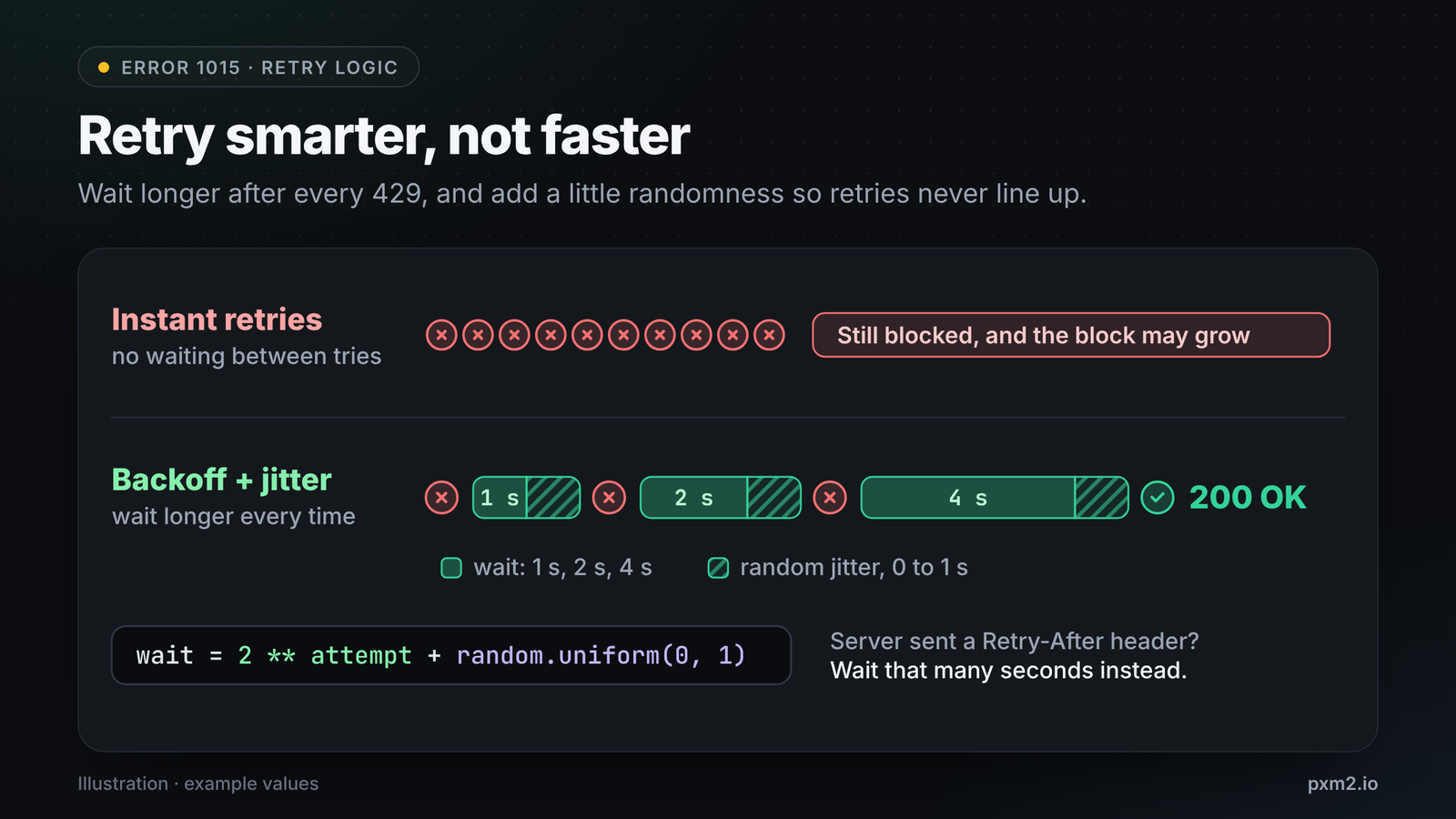
If you get a 429, don't immediately retry. Wait, and if you get it again, wait even longer. Introduce some randomness (jitter) so multiple workers aren't all retrying at the same time, and always respect the Retry-After header if the site sends it.
import random
import time

import requests


def fetch(url, session, max_tries=5):
    for attempt in range(max_tries):
        resp = session.get(url, timeout=20)
        if resp.status_code != 429:
            return resp
        retry_after = resp.headers.get("Retry-After", "")
        wait = int(retry_after) if retry_after.isdigit() else 2 ** attempt
        wait += random.uniform(0, 1)  # jitter, so retries never line up
        print(f"429 received, waiting {wait:.1f}s")
        time.sleep(wait)
    raise RuntimeError(f"Still rate limited after {max_tries} tries: {url}")


session = requests.Session()
resp = fetch("https://your-site.example/", session)
print(resp.status_code)
2. Reuse Sessions and Cache
Using one session keeps your cookies, and caching means you won't request the same page twice. Fewer requests make it less likely that you'll hit the rule.
3. Spread the Load Across Clean IPs
If you need to make more requests than a single IP will allow, such as checking prices on 10,000 product pages, pacing alone won't be enough. You need to spread your requests across several IPs to keep each one below the limit, as shown in Figure 2, left.
The type of IP matters. Datacenter IPs are easy to identify as servers, and they tend to share the reputation of the whole range, so they often get blocked first. Mobile IPs come from carrier networks where many phones share one IP via carrier-grade NAT. Blocking that address would effectively lock out real customers, so sites are generally more cautious with mobile IPs. For the full comparison, see mobile vs residential vs datacenter proxies.
Test it from your terminal:
export PROXY="http://USERNAME:PASSWORD@gb1.pxm2.io:PORT"
curl -s -x "$PROXY" -o /dev/null -w "%{http_code}\n" "$URL"
curl -s -x "$PROXY" https://ipinfo.io/json
{
  "ip": "82.132.xxx.xxx",
  "country": "GB",
  "org": "AS35228 Telefonica UK Limited"
}
Example output, trimmed. The org field shows O2's network (Telefonica UK), which is the same kind of IP real phone users would browse from.
With pxm2.io you can pick your exit country, rotate to a new IP on a timer or at any time you like, or use a sticky session for 30 minutes to 2 hours if you need to stay on one IP for a login. The mobile proxy rotation guide covers all of that.
A quick note: using a proxy won't increase a site's limit at all. It just means you're spreading your traffic across more IPs. If the rule is based on cookies or you're sending requests too quickly, new IPs won't make any difference. Slow down first, then spread your requests.
4. Keep Your Client Consistent
Rules can be based on header, cookie or fingerprint, so simply rotating IPs while making the same bot-like requests won't help. You need to use realistic headers and stick to one client per session. Mobile proxy headers and fingerprinting are more complicated subjects.
How to Fix Error 1015 as a Site Owner
If real customers report 1015:
- Find the request. In the Cloudflare dashboard, go to Security > Events and search by Ray ID or visitor IP.
- Check the rule that fired: its threshold, period and mitigation timeout.
- Try extending the window. Cloudflare suggests a longer window, such as 10 seconds rather than 1, because shorter windows can block normal bursts, like a page loading many assets.
- Count shared IPs appropriately, as offices and mobile networks often have many users behind one IP. On the Business and Enterprise plans you can use "IP with NAT support" to count them separately.
- Consider a challenge rather than a block for traffic that's on the borderline, so real users can still get through.
Error 1015 vs. Other Cloudflare Errors
| Error | Meaning | HTTP status |
|---|---|---|
| 1015 | You are being rate limited | 429 |
| 1005 | Your network (ASN) is banned | 403 |
| 1006, 1007, 1008 | Your IP address is banned | 403 |
| 1020 | A firewall rule blocked you | 403 |
FAQ
Is error 1015 permanent?
No. The block only lasts as long as the site owner set it, then you regain access. It feels permanent if you keep retrying repeatedly.
Why am I getting error 1015 after a couple of requests?
You could be sharing an IP with others on a VPN, office, or public Wi-Fi, or the page could have a hard limit on login or checkout pages.
Does a VPN fix error 1015?
Sometimes. A VPN will give you a new IP, but many people share VPN IPs and hit limits quickly. Using your phone's mobile data is often more reliable.
Will a proxy stop error 1015?
A proxy will help if the rule counts IPs and your traffic is legitimate. It won't help if the rule counts cookies or fingerprints, or if you're sending requests too quickly. Slow down first and then spread out your requests.
Need Clean IPs for Heavy Workloads?
pxm2.io has real 4G/5G mobile proxies on carrier networks in the US, UK, France, Spain, Singapore, India, and Poland. You can ask support for a free trial and test them with your target before deciding. View plans →
Sources: Cloudflare Docs: Error 1015, Cloudflare Docs: Rate limiting rules, Cloudflare Docs: Rate limiting parameters, Cloudflare Docs: Troubleshooting 1xxx errors