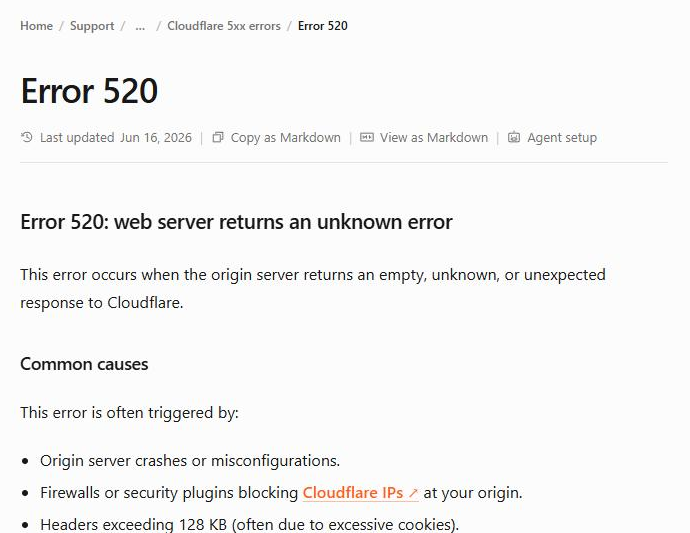
Error code 520 means the website's own server sent Cloudflare an empty or broken reply (so Cloudflare had nothing to give you). It's almost always the website's problem rather than a block on you and a simple reload a minute later will often fix it.
When error 520 is only happening to you or only to your script then something in your requests is annoying the server (too many requests, oversized cookies, or a security tool that doesn't like your IP address). The following is how to work out which it is and how to fix it.
Jump to: I'm just browsing · I run scripts · I own the site
Quick Answer
| At a glance | Error code 520 |
|---|---|
| Sent by | Cloudflare, on behalf of a server that answered badly |
| Standard HTTP code? | No, it's Cloudflare's own |
| Usual cause | The site's server crashed, dropped the connection, or sent oversized headers |
| How long | Seconds for a crash, until fixed for a bad setup |
| First fix | Reload once, then try another network |
What Error Code 520 Means
A site behind Cloudflare has two servers in the path. Cloudflare takes your request and passes it on to the site's actual server (the origin). The origin responds to Cloudflare and Cloudflare then responds to you.
Cloudflare error code 520 is the error you get when the origin's response comes back as empty or corrupted. Cloudflare can't pass it on so it just serves its own error page.
You can see what "empty" looks like. Here's curl talking to a test server which accepts the connection and then hangs up with absolutely no output:
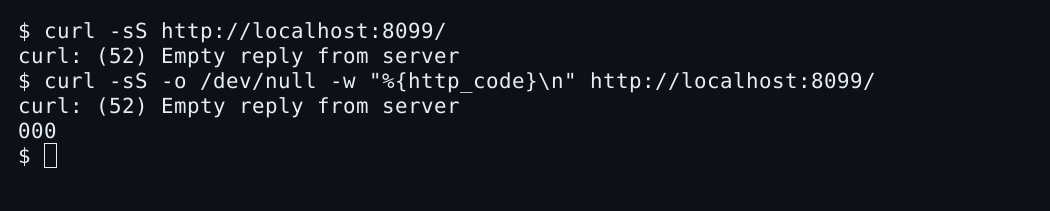
000 means no HTTP reply at all. If the origin is doing that to Cloudflare you'll get a 520.Cloudflare's docs list the usual causes:
- The origin either crashed or restarted in the middle of the request.
- A firewall or security plugin on the origin blocks Cloudflare's IPs.
- Headers over 128 KB (typically due to an excess of cookies).
- A reply with no status code and no headers.
- A broken HTTP/2 setup on the origin.
- Authenticated Origin Pulls turned on, the origin though isn't set up for it.
Reading the 520 Error Page
The error page itself shows four useful details:
- Three icons at the top: You (your browser), Cloudflare and Host (the site's server). On a 520 the first two say Working and Host says Error. That's Cloudflare telling you the fault is past its edge.
- The Cloudflare icon indicates the city name of the datacenter which processed your request.
- The Ray ID at the bottom is the ID of your specific request and the site owner can use that to look up your request in their logs.
- Your IP address is adjacent to the Ray ID behind a "Click to reveal" link. Note it if you intend to contact the site for assistance.
If all three icons say Working and you still can't get the page to load then it's not a 520. Just look at the error number again.
Is It Just You?
First, check that the 520 error code really came from Cloudflare:
URL="https://your-site.example/"
curl -s -o /dev/null -w "%{http_code}\n" "$URL"
curl -s -o /dev/null -D - "$URL" | grep -iE "^(server|cf-ray)"
Here's the same check on a live site behind Cloudflare:
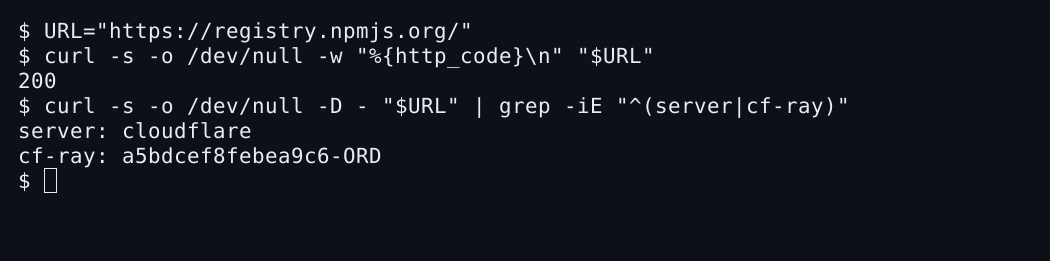
520 with the same two headers. Save the cf-ray value as the site owner will need it to track down your request.Next check whether it fails for everyone. Open the page up on another network (your phone on mobile data for instance). If it fails there as well then the site is down and you're just going to have to wait. If it loads then the problem is with your connection.
To see which IP Cloudflare sees for you, add /cdn-cgi/trace to the site's address. Here it is on pxm2.io:
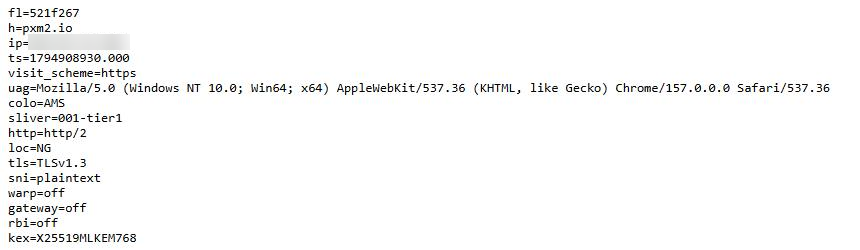
ip is the address Cloudflare sees, colo is the Cloudflare datacenter you're connecting to and loc is your country. Compare it before and after you switch networks.If You're Browsing
- Wait a minute and reload. Crashed servers frequently come back on their own.
- Clear the cookies for that one site. Too many cookies will push the headers past Cloudflare's limit.
- Try another network. If it loads up on mobile data then the issue is definitely to do with your connection.
- Report it with the Ray ID. Send the site a screenshot of the error page (with the Ray ID included) and the time.
Flushing the DNS, switching browsers or rebooting your router generally won't help with a 520. The problem is between Cloudflare and the site's server.
If You Run Scripts
Scripts can in fact trigger 520 errors on their own as a result of thousands of requests simply overwhelming a weak server.
Retry a few times rather than forever. A 520 is often just a blip so a short retry is perfectly sensible as opposed to a 1005.
import time
import requests

def get_with_retry(url, proxies=None, tries=3):
    for attempt in range(1, tries + 1):
        resp = requests.get(url, proxies=proxies, timeout=30)
        cloudflare_520 = (
            resp.status_code == 520
            and resp.headers.get("server", "").lower() == "cloudflare"
        )
        if not cloudflare_520:
            return resp
        ray = resp.headers.get("cf-ray", "n/a")
        print(f"520 on attempt {attempt}, cf-ray {ray}")
        if attempt < tries:
            time.sleep(2 ** attempt)  # wait 2s, then 4s
    return resp
Log every cf-ray. If you ever go to the site owner for any assistance that's the very first thing they'll want.
Keep the sessions light. A session which takes every cookie that is handed to it will grow with each request. Start off with fresh sessions from time to time.
Slow down. If you're getting 520s in bursts when you speed up then you're overloading the origin. Reduce concurrency and spread out your requests.
Check whether it follows your IP. A lot of sites will read your real IP from the CF-Connecting-IP header that Cloudflare puts in. If a security tool on the origin has flagged your IP and just silently dropped your connection then Cloudflare gets nothing back and you're the only one who sees a 520.
Test it by sending the same request through a different, clean IP:
export PROXY="http://USERNAME:PASSWORD@gb1.pxm2.io:PORT"
curl -s -o /dev/null -w "direct: %{http_code}\n" "$URL"
curl -s -o /dev/null -w "proxy:  %{http_code}\n" -x "$PROXY" "$URL"
If the direct request fails and the proxied one works then the 520 is down to your IP. If both fail then it's the site and no proxy is going to help. Whatever IP you're testing with, make sure it's clean first (our IPHub guide will tell you how to do that).
Either way, stick to the public data, abide by the site's terms and back off when a server is struggling.
If You Own the Site
The fix is almost always on your origin:
- Just go and look at the error logs from the origin at the time of the error. Look for crashes, restarts and out-of-memory kills.
- Allowlist Cloudflare's IP ranges in your firewall and security plugins.
- Return a proper 403 not a dropped connection if your security tools are blocking the visitor. A silent drop becomes a 520 which tells you absolutely nothing.
- Keep your headers well under 128 KB. Watch the cookie size grow.
- Test HTTP/2 to the origin. Turn it off under Speed > Settings > Protocol Optimization. If the 520s cease then you've got a problem with the origin's HTTP/2 setup.
- Check Authenticated Origin Pulls if you've turned that on.
- Bypass Cloudflare for a moment by setting the DNS record to DNS only to see exactly what your server is sending.
Find the 520s in Your Logs
If you're using Logpush then have a look at OriginResponseStatus in the http_requests dataset. A value of 0 with a cache status (CacheCacheStatus) of miss or expired means Cloudflare got to your origin and got no HTTP response back from it. Those are your 520s. A 0 with a hit or revalidated is perfectly normal as Cloudflare just served the page from cache without having to query your server at all.
In Origin Analytics compare originResponseStatus with edgeResponseStatus. An origin 200 next to an edge 520 means your server thought it had answered OK, but the response was malformed (usually due to oversized headers or the connection being closed too early). The Top endpoints table will tell you which pages are generating the most 520s and that's where you need to look first.
If that doesn't find it then send Cloudflare Support the URL, the cf-ray value, the /cdn-cgi/trace output and two HAR files (one with Cloudflare on and one with it off).
Error 520 vs. Other 5xx Errors
| Error | Cloudflare's name | What happened |
|---|---|---|
| 520 | Web server returns an unknown error | Origin replied with nothing usable |
| 521 | Web server is down | Origin refused the connection |
| 522 | Connection timed out | Origin didn't accept the connection in time |
| 523 | Origin is unreachable | Cloudflare can't route to the origin |
| 524 | A timeout occurred | Origin connected but took too long |
| 525 | SSL handshake failed | Secure connection to the origin failed |
| 526 | Invalid SSL certificate | Origin's certificate didn't validate |
If you're being blocked or rate limited you'll see a 1xxx error (e.g. 1005 or 1015) instead.
FAQ
Is error code 520 my fault?
Normally not. It's only on your side if it's happening to you and not anyone else, which would point to your cookies, request rate, or IP.
How long does error 520 last?
A crashed server can be back in seconds. A broken setup however is going to stay broken until the owner actually fixes it.
Is HTTP 520 a real status code?
Not a standard one. Cloudflare uses it in one scenario: when the origin returns an empty, unknown or unexpected reply.
Can a VPN or proxy fix error 520?
Only if the 520 is bound to your IP. If it fails from every network then it won't help.
Can error 520 harm my SEO?
A short outage won't. Google's crawlers will just slow down when they encounter 5xx errors and pages already in the index will remain in the index for a while. If the 520s are going on for days then Google will eventually drop those pages.
Does clearing my browser cache fix error 520?
Rarely. Clearing the cookies for that one site will often help (the oversized cookies being one of the causes). Clearing the entire cache makes no difference in the case of a server side fault.
What's the difference between error 520 and 521?
A 521 is the origin refusing the connection. A 520 is the origin accepting the connection but sending back something that Cloudflare couldn't use.
Run the Direct vs. Proxy Test Yourself
To work out whether a 520 is following your IP you need a second clean IP to compare it against. pxm2.io provides you with real 4G and 5G mobile IPs on the carrier networks (O2 in the UK for example) with locations available in the US, France, Spain, Singapore, India and Poland. Just ask support for a free 1 hour trial and run the test on your own target. View plans →
Sources: Cloudflare Docs: Error 520, Cloudflare Docs: 5xx errors, Cloudflare Docs: Restoring original visitor IPs, Google: How HTTP status codes affect Google's crawlers