移动代理 eBay 数据抓取
抓取 eBay 商品价格、卖家指标及实时竞拍出价:原生化解 splashui Wasm 验证、双重 JSON-LD 解析与不限流蜂窝 CGNAT 代理。
- 化解 Wasm 验证 — 让 Chrome 原生解决 splashui 质询,避免出现 403 错误。
- 双重 JSON-LD 与 DOM 提取 — 直接获取标准价格与 1600px 高清缩放图,无需解析脆弱的前端布局标签。
- 运营商 CGNAT 信誉保障 — 共享移动 IP 无法被直接一刀切封禁,否则会误伤海量真实买家。
- 不限流量 — 放心抓取包含大量高分辨率图片的商品详情页,无需支付流量超额费用。
真实的蜂窝运营商 IP 池能够绕过针对数据中心网段的激进黑名单。
抓取成千上万张高分辨率商品图片,无需按 GB 支付高昂流量费用。
核心机制:eBay 页面工作原理全解
采集 eBay 商品数据(价格、卖家评分、规格参数和实时拍卖出价)对竞品监控、价格追踪和电商市场研究至关重要。使用自动化浏览器访问 eBay 时,通常会经历三个阶段:
- 1. 初始安全检查: eBay 使用其 splashui (app ID orch) 验证服务检查浏览器特征签名。具备 WebAssembly 执行能力的真实浏览器会在 2 到 3 秒内完成工作量证明,并自动跳转至目标商品。
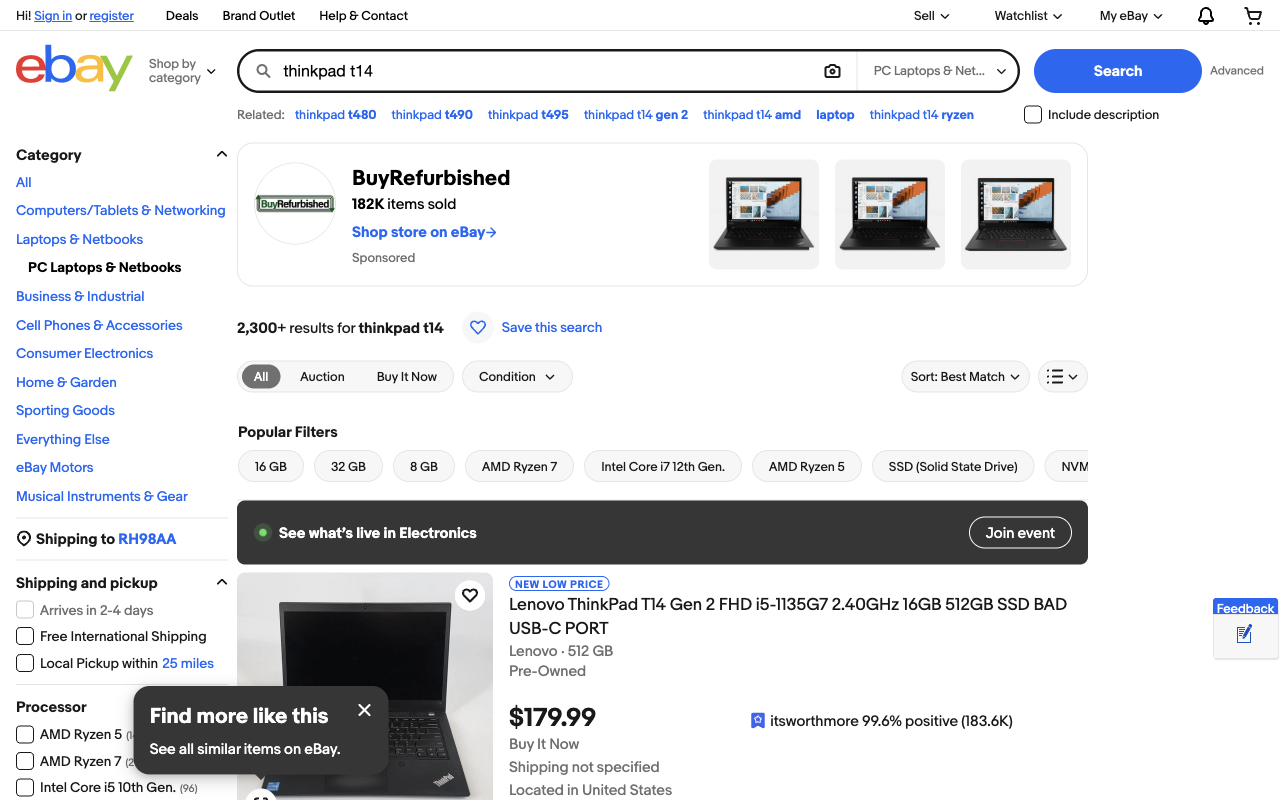
- 2. 搜索结果卡片: 搜索请求会返回 ul.srp-results 内的模块化商品卡片 (li.s-card)。数字商品 ID 会直接暴露在 data-listingid 属性或商品链接中。
- 3. 商品详情页面: 商品详情页在后台内嵌了规范的 schema.org Product JSON-LD 结构化数据,同时技术参数由语义化的说明列表 (
- ) 呈现。
[ 1. Start Chrome CDP ] ──► [ 2. Search eBay ] ──► [ 3. Extract JSON-LD & DOM ] ──► [ 4. Save CSV/JSON ]
步骤 1:启动 Chrome 并接入 Playwright(仅需 4 行代码)
为避免被 eBay 的反爬机器人检测拦截,启动一个开启了远程调试端口的真实 Chrome 实例,然后通过 Chrome DevTools Protocol (CDP) 连接 Playwright。
1. 启动开启远程调试的 Chrome
/Applications/Google\ Chrome.app/Contents/MacOS/Google\ Chrome --remote-debugging-port=9222 --user-data-dir=/tmp/chrome-debug2. 通过 Python 连接浏览器
import asyncio
from playwright.async_api import async_playwright

async def get_page():
    p = await async_playwright().start()
    browser = await p.chromium.connect_over_cdp("http://localhost:9222")
    context = browser.contexts[0]
return await context.new_page()步骤 2:检索商品并轻松化解 2 秒验证
当访问搜索结果时,eBay 可能会短暂显示 'Pardon Our Interruption...' 拦截屏幕。真实 Chrome 在 2 秒内自然执行客户端 Argon2 WebAssembly 验证,并自动重定向至搜索结果。
async def search_ebay(page, query):
    url = f"https://www.ebay.com/sch/i.html?_nkw={query.replace(' ', '+')}"
    await page.goto(url, wait_until="load", timeout=45000)

    # If the splashui check appears, wait for automatic redirect
    if "splashui" in page.url or "Pardon" in await page.title():
        print("Waiting for eBay security check to pass...")
        await page.wait_for_url(lambda u: "splashui" not in u, timeout=20000)

    # Wait until product cards appear
    await page.wait_for_selector("li.s-card, li.s-item", timeout=15000)
return await page.content()步骤 3:提取列表卡片(标题、价格与图片)
在搜索页面中,每个商品均位于 li.s-card 元素内。数字 Item ID 可从 data-listingid 属性或标准商品 URL 中直接提取。
import re
from bs4 import BeautifulSoup

def parse_search_cards(html):
    soup = BeautifulSoup(html, "html.parser")
    cards = soup.select("ul.srp-results > li.s-card, li.s-item")

    items = []
    for card in cards:
        # Extract numeric Item ID from attribute or link
        item_id = card.get("data-listingid")
        link = card.select_one("a.s-card__link, a[href*='/itm/']")
        if not link:
            continue

        url = link.get("href", "")
        if not item_id:
            m = re.search(r"/itm/(?:.*?/)?(\d{9,14})", url)
            item_id = m.group(1) if m else None

        # Filter out sponsored promo cards like 'Shop on eBay'
        if not item_id or not item_id.isdigit():
            continue

        title_el = card.select_one(".s-card__title, [role='heading']")
        raw_title = title_el.get_text(strip=True) if title_el else ""
        title = re.sub(r"Opens in a new window or tab", "", raw_title, flags=re.I).strip()

        price_el = card.select_one(".s-card__price, .s-item__price")
        price = price_el.get_text(strip=True) if price_el else ""

        img_el = card.select_one("img.s-card__image, img")
        img = img_el.get("src") if img_el else ""

        items.append({
            "id": item_id,
            "title": title,
            "price": price,
            "url": url,
            "image": img
        })
return items步骤 4:提取商品详情(一口价 vs 拍卖竞标)
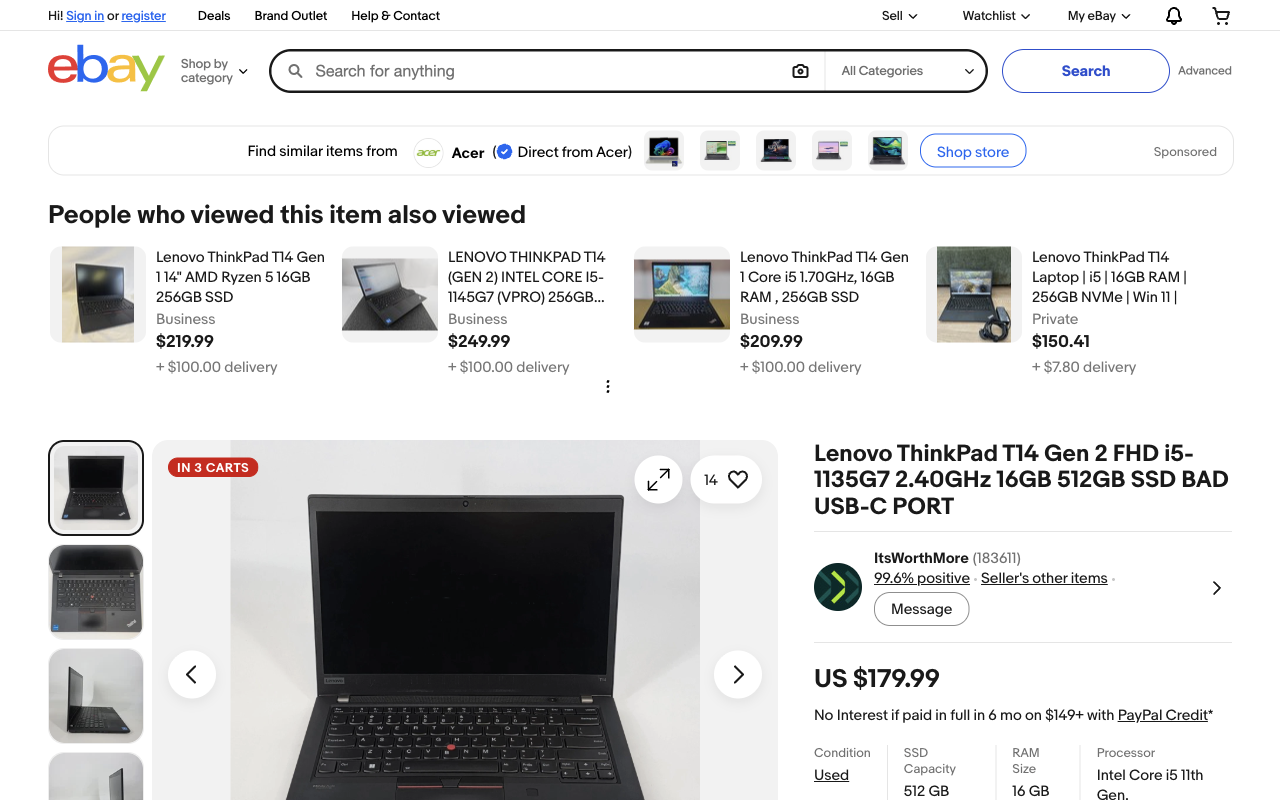
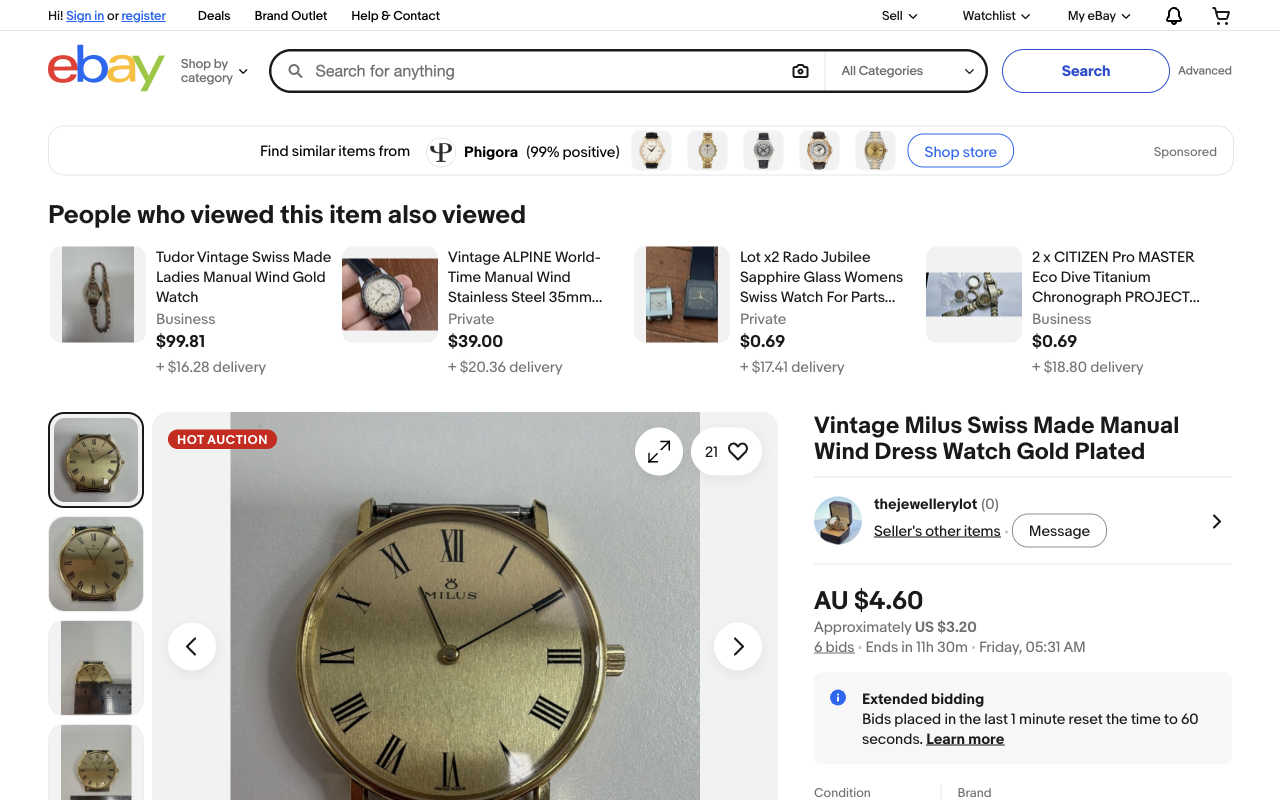
商品详情页主要有两种展现形态:一口价(立即购买)与拍卖竞价。
形态 A:一口价(立即购买)商品
非常适合采集类目定价和规格参数。与其解析脆弱的前端 DOM,不如直接读取 eBay 内嵌的 JSON-LD Product 规范元数据:
import json

def parse_product_jsonld(html):
    soup = BeautifulSoup(html, "html.parser")
    for s in soup.find_all("script", type="application/ld+json"):
        try:
            data = json.loads(s.string)
            if data.get("@type") == "Product":
                offers = data.get("offers", {})
                return {
                    "title": data.get("name"),
                    "price": offers.get("price"),
                    "currency": offers.get("priceCurrency"),
                    "availability": offers.get("availability", "").split("/")[-1],
                    "images": [img.get("url") if isinstance(img, dict) else img
                               for img in data.get("image", [])]
                }
        except Exception:
            continue
return {}提取详细技术参数 (- )
内存、处理器、存储容量和型号等核心规格位于整齐的语义化描述列表中:
def parse_item_specifics(html):
    soup = BeautifulSoup(html, "html.parser")
    specs = {}
    for dl in soup.select(".ux-layout-section-evo dl, dl"):
        for dt, dd in zip(dl.find_all("dt"), dl.find_all("dd")):
            key = dt.get_text(strip=True).rstrip(":")
            val = dd.get_text(strip=True)
            if key and val:
                specs[key] = val
    return specs
形态 B:拍卖商品(出价与倒计时)
对于拍卖类商品,需要精准追踪当前出价次数、竞拍剩余倒计时以及当前的最高有效出价:
def parse_auction_data(html):
    soup = BeautifulSoup(html, "html.parser")
    full_text = soup.get_text(separator=" ", strip=True)

    # 1. Bids count
    bids_match = re.search(r"(\d+)\s+bids?", full_text, re.I)
    bids = int(bids_match.group(1)) if bids_match else 0

    # 2. Time left countdown
    time_match = re.search(r"Ends in\s+([\w\s]+?)(?:[A-Z][a-z]+day|\n|$)", full_text)
    time_left = time_match.group(1).strip() if time_match else "Ended"

    # 3. Current Bid Price
    price_el = soup.select_one(".x-price-primary")
    current_bid = price_el.get_text(strip=True) if price_el else ""

    return {
        "is_auction": bids_match is not None,
        "current_bid": current_bid,
        "bids_count": bids,
        "time_left": time_left
    }
步骤 5:将抓取的数据持久化保存为 CSV 或 JSON
在爬虫完成数据采集后,使用 Python 标准库中的 csv 或 json 模块将数据保存:
import csv

def save_to_csv(products, filename="ebay_products.csv"):
    if not products:
        return
    keys = products[0].keys()
    with open(filename, "w", newline="", encoding="utf-8") as f:
        writer = csv.DictWriter(f, fieldnames=keys)
        writer.writeheader()
        writer.writerows(products)
    print(f"Saved {len(products)} products to {filename}")
3 条防止 IP 封禁的实战法则
大型电商平台严密监控请求节奏与出口 IP 网段。恪守以下三条准则可规避 99% 的反爬拦截:
| 症状 | 根本原因 | 应对方案 |
|---|---|---|
| 首个请求立即返回 HTTP 403 Forbidden | 硬编码虚假/版本不匹配的 User-Agent 字符串或 TLS 指纹 | 使用真实的 Chrome CDP 会话;保持原生浏览器标头 |
| 'Pardon Our Interruption' 页面卡死 | 在 splashui Wasm 验证计算完成前提前关闭页面或跳转 | 添加 wait_for_url(lambda u: 'splashui' not in u, timeout=20000) |
| 发送 30–50 个请求后遭遇 IP 封禁 | 使用已被 Akamai 标记为高危的数据中心静态机房 IP 网段 | 通过支持 CGNAT 的独享 4G/5G 移动代理转发流量 |
为何 eBay 会秒封机房 IP:蜂窝 CGNAT 对比住宅网络
网段信誉是爬虫能够长期稳定运行的决定性因素。eBay 依据自治系统编号 (ASN) 审查入站流量,这使得代理网络架构至关重要:
| 代理类型 | IP信任评分 | eBay 封锁率 | 定价模式 | 最适合 |
|---|---|---|---|---|
| 数据中心 | 低(数据中心服务器 ASN) | 80% 至 95% 遭到封锁 | 固定包月 | 无法用于 eBay 采集 |
| 住宅代理(按流量计费) | 中度至高度 | 低于10% | 按 GB 计费($4–$8/GB) | 适用于小规模单次查询 |
| 专用 4G/5G 移动网络 | 极高(移动运营商 CGNAT) | 低于1% | 固定包月(不限流量) | 适合全量目录持续抓取 |
实体移动代理通过 EE、Vodafone、AT&T 和 Movistar 等主流电信网络的运营商级 NAT (CGNAT) 进行路由。由于蜂窝网络让数千台真实智能手机共用同一个公网 IPv4,电商平台绝不敢全网段封禁运营商 IP,否则会导致真实手机买家无法下单。PXM2 提供不限流量的独享 4G 和 5G 硬件设备,让您能够持续采集图片密集的商品图库和价格索引,远离高昂流量超额账单。
获取用于 eBay 抓取的独享移动代理
PXM2 实时在线机房 — 在您监控的目标市场选择独享 4G/5G 硬件,享受不限流量与按需 IP 轮换:
法国
新加坡
印度
常见问题解答
为什么 eBay 会返回 HTTP 403 或 "Pardon Our Interruption"?
eBay 使用名为 splashui (app ID orch) 的中间服务保护其商品目录,该服务会执行 Argon2 WebAssembly 工作量证明计算。纯 HTTP 库(如 requests 或 curl)无法执行 WebAssembly,因而会收到 403 错误。通过 CDP 连接真实浏览器可在 2 至 3 秒内完成验证并自动跳转到目标商品。
可以不使用无头浏览器抓取 eBay 吗?
除非您使用第三方代解验证代理或预先生成已验证的会话 Token。对于自建采集流水线,通过 CDP 将 Playwright 连接到持久化的真实 Chrome 实例是最可靠的架构,因为它保留了真实的浏览器 TLS 指纹和原生 V8 引擎执行能力。
如何稳定提取商品成色与技术规格?
从网页内嵌的 schema.org Product JSON-LD 代码块 (offers.itemCondition) 提取成色,它将成色标准化为 UsedCondition、NewCondition 或 RefurbishedCondition 等规范枚举值。技术参数则位于详情页的语义化说明列表 (<dl><dt><dd>) 中。
eBay Browse API 与网页抓取之间有何区别?
官方 Browse API 适合目录同步、订单管理和已授权的店铺操作,但有每日调用频率限制且需要申请权限。网页抓取则提供实时、免登录的访客买家视角 — 包含本地化的运费预估、卖家正在进行的促销活动和竞拍倒计时。
在大规模采集时如何防止 eBay 封禁 IP?
保持每个并发线程的请求间隔在 1.5 到 3.0 秒之间,确保 User-Agent 与底层浏览器内核版本严格一致,并通过独享 4G 或 5G 移动代理转发流量。由于移动运营商通过 CGNAT 让数千部手机共享同一个 IP,eBay 无法对其进行一刀切封禁。
相关移动代理指南
eBay 采集只是冰山一角,本技术集群还涵盖其底层的更多架构与实战策略。