Mobile Proxy eBay Scraping
Scraping eBay product prices, seller metrics, and live auction bids: passing the splashui Wasm challenge natively, dual JSON-LD parsing, and unmetered cellular CGNAT proxies.
- Wasm challenge survival — let Chrome solve the splashui check natively instead of getting a 403.
- Dual JSON-LD & DOM extraction — extract canonical prices and 1600px zoom photos without parsing brittle layout divs.
- Carrier CGNAT reputation — shared mobile IPs cannot be blanket-banned without blocking genuine buyers.
- Unlimited bandwidth — crawl image-heavy product galleries without paying per-gigabyte overages.
Real cellular carrier IP pools bypass aggressive datacenter subnet blacklists.
Crawl thousands of high-resolution product photos without paying per-gigabyte bandwidth fees.
The Big Picture: How eBay Pages Work
Extracting eBay product data—prices, seller ratings, specifications, and live auction bids—is essential for competitor analysis, price tracking, and e-commerce research. When you navigate to eBay in an automated browser, three distinct stages take place:
- 1. Initial Security Check: eBay inspects your browser signature using its splashui challenge (app ID orch). A genuine browser with WebAssembly execution solves this proof-of-work in two to three seconds and auto-redirects to the target product.
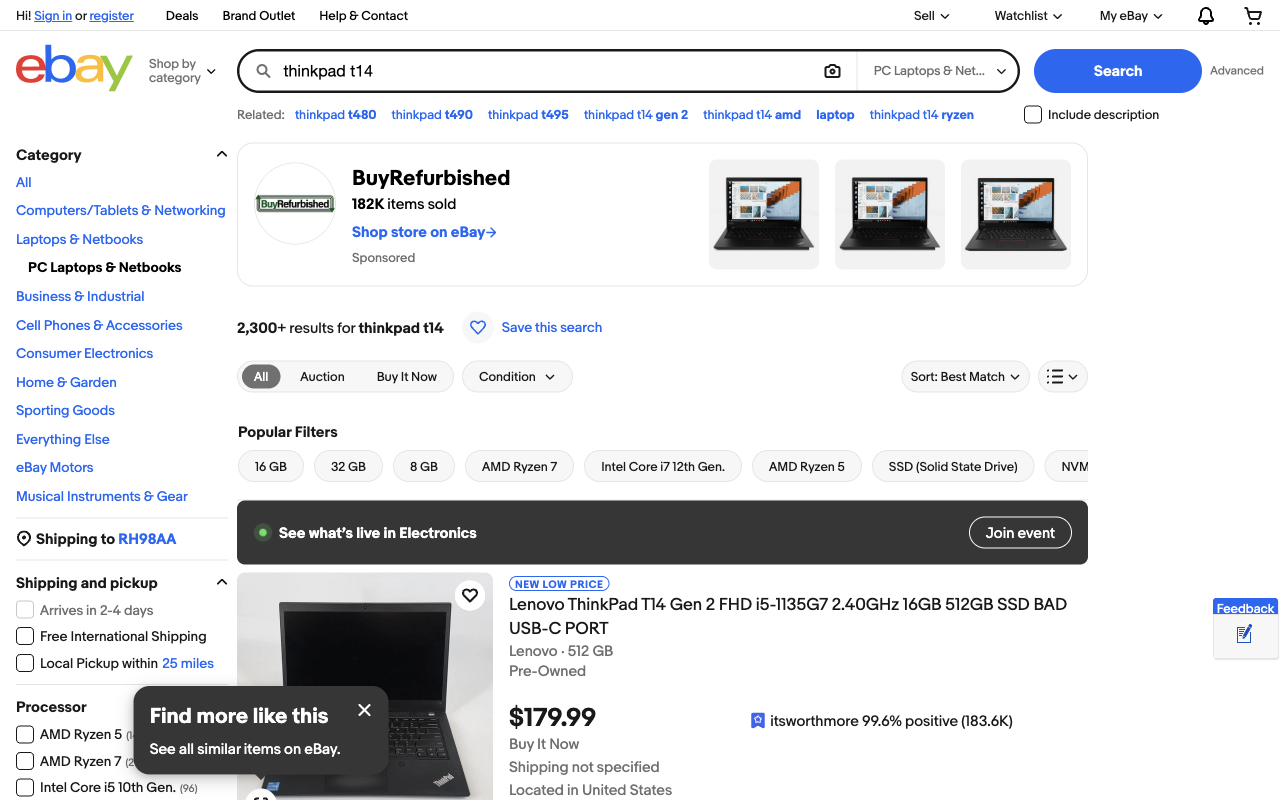
- 2. Search Result Cards: Search queries return modular product cards (li.s-card) inside ul.srp-results. The numeric listing ID is exposed directly in data-listingid or the item URL.
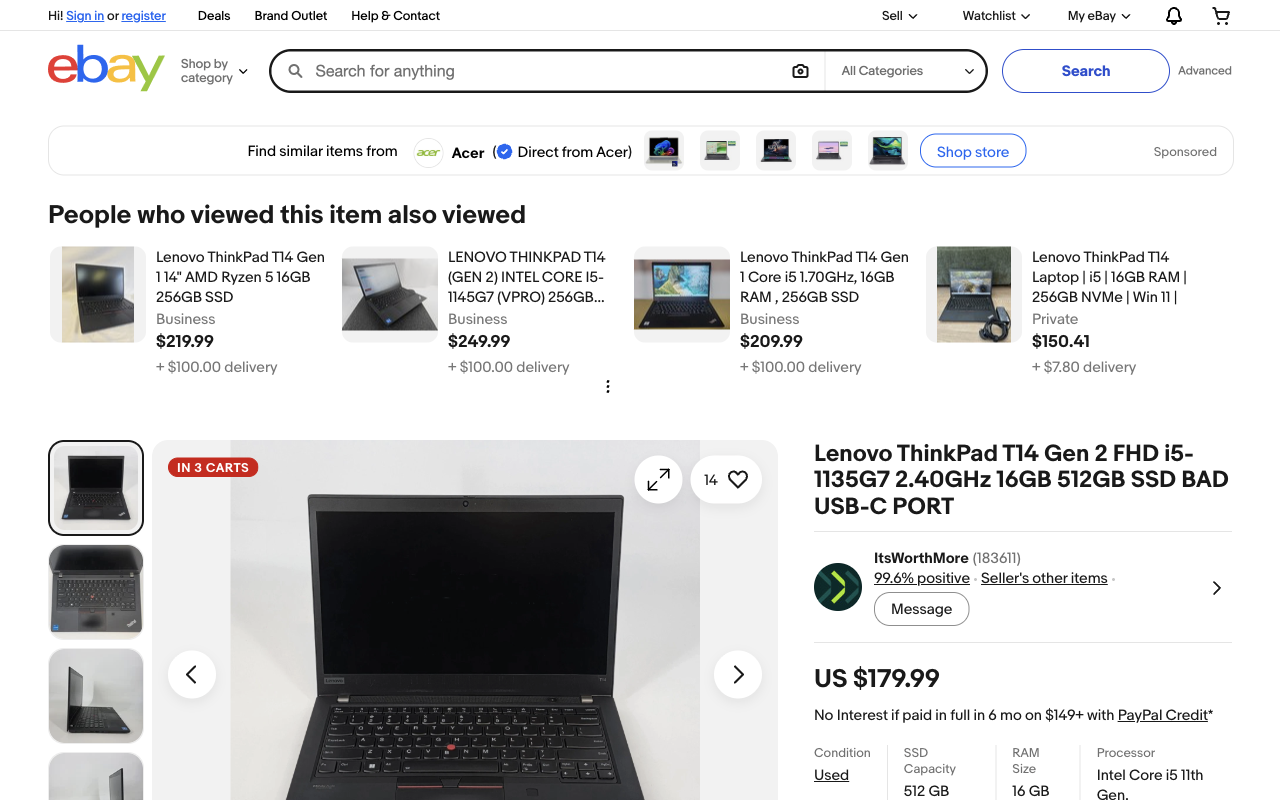
- 3. Product Listing Pages: Product pages embed structured schema.org Product JSON-LD behind the scenes, alongside semantic description lists (
- ) for technical specifications.
[ 1. Start Chrome CDP ] ──► [ 2. Search eBay ] ──► [ 3. Extract JSON-LD & DOM ] ──► [ 4. Save CSV/JSON ]
Step 1: Start Chrome & Connect Playwright (4 Lines)
To avoid getting blocked by eBay's bot detection, start a real Chrome browser instance with remote debugging enabled, then attach Playwright over Chrome DevTools Protocol (CDP).
1. Launch Chrome with Remote Debugging
/Applications/Google\ Chrome.app/Contents/MacOS/Google\ Chrome --remote-debugging-port=9222 --user-data-dir=/tmp/chrome-debug2. Connect Python to the Browser
import asyncio
from playwright.async_api import async_playwright

async def get_page():
    p = await async_playwright().start()
    browser = await p.chromium.connect_over_cdp("http://localhost:9222")
    context = browser.contexts[0]
return await context.new_page()Step 2: Search Products & Handle the 2-Second Check
When navigating to search results, eBay might show a brief 'Pardon Our Interruption...' screen. Real Chrome runs the client-side Argon2 WebAssembly check in two seconds and automatically redirects to search results.
async def search_ebay(page, query):
    url = f"https://www.ebay.com/sch/i.html?_nkw={query.replace(' ', '+')}"
    await page.goto(url, wait_until="load", timeout=45000)

    # If the splashui check appears, wait for automatic redirect
    if "splashui" in page.url or "Pardon" in await page.title():
        print("Waiting for eBay security check to pass...")
        await page.wait_for_url(lambda u: "splashui" not in u, timeout=20000)

    # Wait until product cards appear
    await page.wait_for_selector("li.s-card, li.s-item", timeout=15000)
return await page.content()Step 3: Extract Search Cards (Titles, Prices & Photos)
On the search page, each product item sits inside a li.s-card element. The numeric Item ID can be extracted from data-listingid or the canonical URL.
import re
from bs4 import BeautifulSoup

def parse_search_cards(html):
    soup = BeautifulSoup(html, "html.parser")
    cards = soup.select("ul.srp-results > li.s-card, li.s-item")

    items = []
    for card in cards:
        # Extract numeric Item ID from attribute or link
        item_id = card.get("data-listingid")
        link = card.select_one("a.s-card__link, a[href*='/itm/']")
        if not link:
            continue

        url = link.get("href", "")
        if not item_id:
            m = re.search(r"/itm/(?:.*?/)?(\d{9,14})", url)
            item_id = m.group(1) if m else None

        # Filter out sponsored promo cards like 'Shop on eBay'
        if not item_id or not item_id.isdigit():
            continue

        title_el = card.select_one(".s-card__title, [role='heading']")
        raw_title = title_el.get_text(strip=True) if title_el else ""
        title = re.sub(r"Opens in a new window or tab", "", raw_title, flags=re.I).strip()

        price_el = card.select_one(".s-card__price, .s-item__price")
        price = price_el.get_text(strip=True) if price_el else ""

        img_el = card.select_one("img.s-card__image, img")
        img = img_el.get("src") if img_el else ""

        items.append({
            "id": item_id,
            "title": title,
            "price": price,
            "url": url,
            "image": img
        })
return itemsStep 4: Extract Product Details (Buy It Now vs Auction)
Product pages come in two distinct formats: Fixed Price (Buy It Now) and Auction.
Option A: Buy It Now Listing
Ideal for catalog pricing and inventory specs. Instead of scraping fragile visual markup, extract eBay's embedded JSON-LD Product schema:
import json

def parse_product_jsonld(html):
    soup = BeautifulSoup(html, "html.parser")
    for s in soup.find_all("script", type="application/ld+json"):
        try:
            data = json.loads(s.string)
            if data.get("@type") == "Product":
                offers = data.get("offers", {})
                return {
                    "title": data.get("name"),
                    "price": offers.get("price"),
                    "currency": offers.get("priceCurrency"),
                    "availability": offers.get("availability", "").split("/")[-1],
                    "images": [img.get("url") if isinstance(img, dict) else img
                               for img in data.get("image", [])]
                }
        except Exception:
            continue
return {}Extracting Technical Specifications (- )
Technical specifics like RAM, Processor, Storage, and Model live in clean semantic description lists:
def parse_item_specifics(html):
    soup = BeautifulSoup(html, "html.parser")
    specs = {}
    for dl in soup.select(".ux-layout-section-evo dl, dl"):
        for dt, dd in zip(dl.find_all("dt"), dl.find_all("dd")):
            key = dt.get_text(strip=True).rstrip(":")
            val = dd.get_text(strip=True)
            if key and val:
                specs[key] = val
    return specs
Option B: Auction Listing (Bids & Countdown Timer)
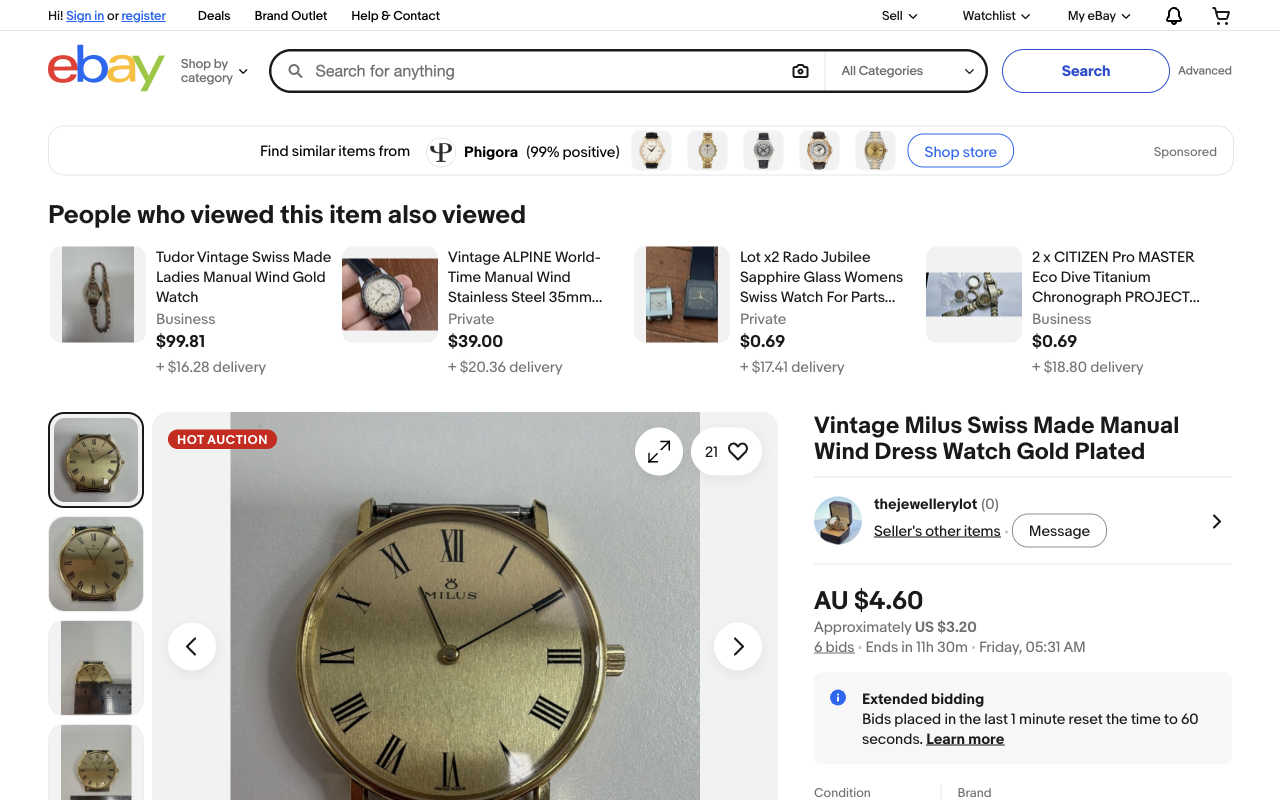
For auctions, you need to track live bid counts, remaining countdown time, and the current winning bid:
def parse_auction_data(html):
    soup = BeautifulSoup(html, "html.parser")
    full_text = soup.get_text(separator=" ", strip=True)

    # 1. Bids count
    bids_match = re.search(r"(\d+)\s+bids?", full_text, re.I)
    bids = int(bids_match.group(1)) if bids_match else 0

    # 2. Time left countdown
    time_match = re.search(r"Ends in\s+([\w\s]+?)(?:[A-Z][a-z]+day|\n|$)", full_text)
    time_left = time_match.group(1).strip() if time_match else "Ended"

    # 3. Current Bid Price
    price_el = soup.select_one(".x-price-primary")
    current_bid = price_el.get_text(strip=True) if price_el else ""

    return {
        "is_auction": bids_match is not None,
        "current_bid": current_bid,
        "bids_count": bids,
        "time_left": time_left
    }
Step 5: Save Extracted Data to CSV or JSON
Once your crawler collects listings, persist the data with standard library csv or json modules:
import csv

def save_to_csv(products, filename="ebay_products.csv"):
    if not products:
        return
    keys = products[0].keys()
    with open(filename, "w", newline="", encoding="utf-8") as f:
        writer = csv.DictWriter(f, fieldnames=keys)
        writer.writeheader()
        writer.writerows(products)
    print(f"Saved {len(products)} products to {filename}")
3 Practical Rules to Prevent IP Blocks
Marketplaces monitor request cadence and subnet origin. These three rules eliminate 99% of scraping blocks:
| Symptom | Root Cause | How to Fix It |
|---|---|---|
| Immediate HTTP 403 Forbidden | Hardcoding fake/mismatched User-Agent string or TLS fingerprint | Use real Chrome CDP session; keep native browser headers |
| 'Pardon Our Interruption' Hang | Closing or navigating away before the splashui Wasm proof finishes | Add wait_for_url(lambda u: 'splashui' not in u, timeout=20000) |
| IP Ban after 30–50 requests | Scraping on static datacenter IP subnets flagged by Akamai | Route traffic through dedicated 4G/5G mobile proxies with CGNAT |
Why eBay Burns Datacenter IPs: Mobile CGNAT vs Residential
Subnet trust is the deciding factor in scraping longevity. eBay monitors incoming traffic by Autonomous System Number (ASN), making proxy architecture critical:
| Proxy Type | IP Trust Score | eBay Block Rate | Pricing Model | Best For |
|---|---|---|---|---|
| Datacenter | Low (Server ASN) | 80 to 95 per cent blocked | Flat monthly | Not viable for eBay |
| Residential (Metered) | Moderate to High | Under 10 per cent | Pay per GB ($4–$8/GB) | Small one-off lookups |
| Dedicated 4G/5G Mobile | Highest (Carrier CGNAT) | Under 1 per cent | Flat monthly (Unlimited) | Continuous catalog scraping |
Physical mobile proxies operate through Carrier-Grade NAT (CGNAT) on major cellular networks like EE, Vodafone, AT&T, and Movistar. Because mobile carriers assign thousands of legitimate cellular handsets to each public IPv4 address, marketplaces cannot blanket-ban carrier IP subnets without locking out actual smartphone buyers. PXM2 provides dedicated 4G and 5G cellular modems with unmetered bandwidth, allowing you to crawl product galleries and price indices continuously without per-gigabyte bill shock.
Get a Dedicated Mobile Proxy for eBay Scraping
Live PXM2 locations — choose a dedicated 4G/5G modem in the market you monitor, with unlimited bandwidth and on-demand IP rotation:
France
India
Poland
Frequently Asked Questions
Why does eBay return HTTP 403 or "Pardon Our Interruption"?
eBay protects its product catalogue with an interstitial service named splashui (app ID orch) running Argon2 WebAssembly proof-of-work calculations. Pure HTTP libraries like requests or curl cannot execute WebAssembly and receive a 403. Running a real browser over CDP solves the challenge in two to three seconds and auto-redirects to the target product.
Can I scrape eBay without a headless browser?
Only if you use an external challenge-solving proxy or pre-generate validated session tokens. For self-hosted pipelines, running Playwright connected over CDP to a persistent Chrome instance is the most reliable architecture because it preserves real browser TLS signatures and native V8 execution.
How do I extract item condition and specifications reliably?
Extract condition from the embedded schema.org Product JSON-LD block (offers.itemCondition), which standardises conditions into canonical values like UsedCondition, NewCondition, or RefurbishedCondition. Technical specifications live inside semantic description lists (<dl><dt><dd>) in the product layout section.
What is the difference between eBay’s Browse API and web scraping?
The official Browse API is ideal for catalog synchronisation, order management, and authenticated store operations, but carries daily rate limits and requires approval. Web scraping provides the real-time, unauthenticated guest buyer view—including localised shipping estimates, active seller promotions, and auction bidding timers.
How do I prevent eBay IP bans during high-volume crawls?
Keep request intervals between 1.5 and 3.0 seconds per worker, ensure your User-Agent exactly matches your underlying browser engine version, and route traffic through dedicated 4G or 5G mobile proxies. Because mobile carrier IPs are shared by thousands of cellular handsets via CGNAT, eBay does not blanket-ban them.
Related Mobile Proxy Guides
eBay scraping is one vertical; the rest of the cluster covers the technical foundations underneath it.
Web scraping guides
Core mobile proxy guides
Scrape eBay Catalogs Without Subnet Bans
Dedicated 4G/5G mobile modems with real carrier CGNAT trust, on-demand IP rotation, and unlimited bandwidth for product image crawls.
Get a Dedicated Mobile Proxy