Mobile Proxy Amazon Scraping — Scrape Products at Scale
Extract live prices, titles, ratings, and stock levels from Amazon without IP blocks. Beginner-friendly visual guide with Python code, DevTools inspection, and unmetered 4G/5G mobile proxies.
- CGNAT IP trust — mobile carrier IPs eliminate Amazon automated bot flags and robot check CAPTCHAs.
- 8-second rotation API — rotate your public cellular IP instantly on detection via webhook.
- Unlimited bandwidth — crawl image-heavy Amazon product pages with zero per-GB billing.
- Country-level targeting — see localized prices, buy box winners, and shipping availability.
Scrape Amazon.com, Amazon.co.uk, or Amazon.de with native cellular IPs in the target country.
Rotate IP in 8 seconds via API when Amazon challenges your automated bot requests.
Extracting live product data from Amazon is one of the highest-leverage skills in modern e-commerce. With hundreds of millions of items and prices changing continuously, accessing live Amazon data provides the real-time transparency needed to monitor competitors, optimize pricing, and capture market share.
Amazon's official APIs (such as the deprecated PA-API 5.0 or the Creator API) either require active affiliate sales quotas or restrict you exclusively to products you personally own. Web scraping is the only reliable way to monitor the entire public marketplace.
This guide walks through why scraping Amazon products is useful, what businesses use this data for, and how to do it step-by-step with real DevTools inspection, clean Python code, and unmetered mobile proxies.
1. Why Scrape Products on Amazon? (And What It’s Used For)
When you scrape products on Amazon, you replace guesswork with verified market facts. E-commerce businesses and developers rely on this data for five core operations:
| Use Case | Target Data Points | Business Impact |
|---|---|---|
| Dynamic Repricing & Buy Box Tracking | Current Price, Shipping, Buy Box Winner | Automate repricing rules to win the Buy Box without racing to the bottom on profit margins. |
| Competitor Inventory Alerts | Stock Status ('In Stock' / 'Only 2 left') | Detect when primary competitors run out of inventory and automatically increase ad spend to capture lost sales. |
| Review Sentiment Analysis | Review Body, Star Rating, Verified Purchase | Analyze buyer reviews to discover recurring product flaws in competing items and improve your own design. |
| MAP (Minimum Advertised Price) Monitoring | Reseller Price, Third-Party Merchant Name | Brand manufacturers verify that authorized retailers are not undercutting contractual minimum retail prices. |
| Niche & Trend Discovery | Best Sellers Rank (BSR), Sales Velocity | Identify fast-growing product niches and spot emerging consumer trends weeks before competitors notice. |
2. Step-by-Step Guide: How to Scrape Amazon Products with Python
Let's build a clean, working scraper. We will extract the Product Title, Price, Rating, and Image URL, and then scrape entire search result pages.
Step 1: Install Required Libraries
You only need three lightweight, standard Python libraries:
pip install requests beautifulsoup4 pandasStep 2: Avoid the Instant 503 Block (Add Browser Headers)
If you send a basic HTTP request without headers, Amazon detects that your script is an automated bot and immediately serves an HTTP 503 Service Unavailable error.
To look like a real browser, press F12 in Google Chrome, open the Network tab, reload any Amazon page, and click the first request to inspect your Request Headers:
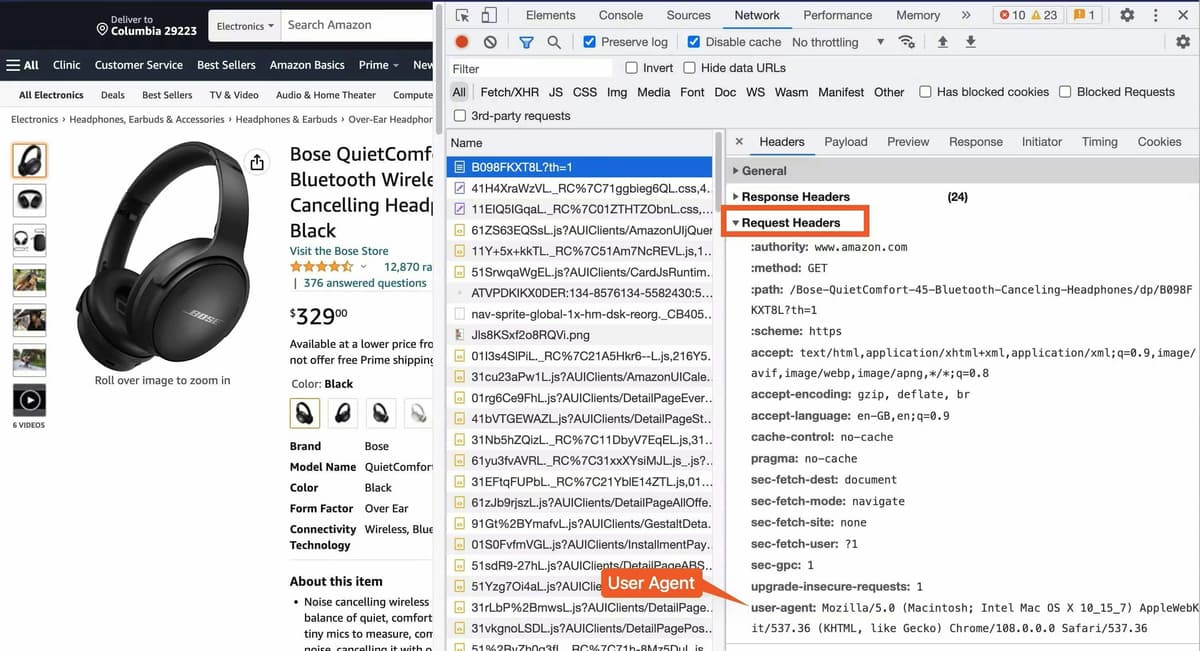
In Python, add these headers to your request dictionary:
import requests

headers = {
    'User-Agent': 'Mozilla/5.0 (Windows NT 10.0; Win64; x64) AppleWebKit/537.36 (KHTML, like Gecko) Chrome/126.0.0.0 Safari/537.36',
    'Accept-Language': 'en-US,en;q=0.9',
    'Accept': 'text/html,application/xhtml+xml,application/xml;q=0.9,image/webp,*/*;q=0.8',
    'Referer': 'https://www.google.com/'
}Step 3: Inspect the Product Details (Title & Price)
Open any Amazon product page in Chrome, right-click on the product title, and select Inspect:
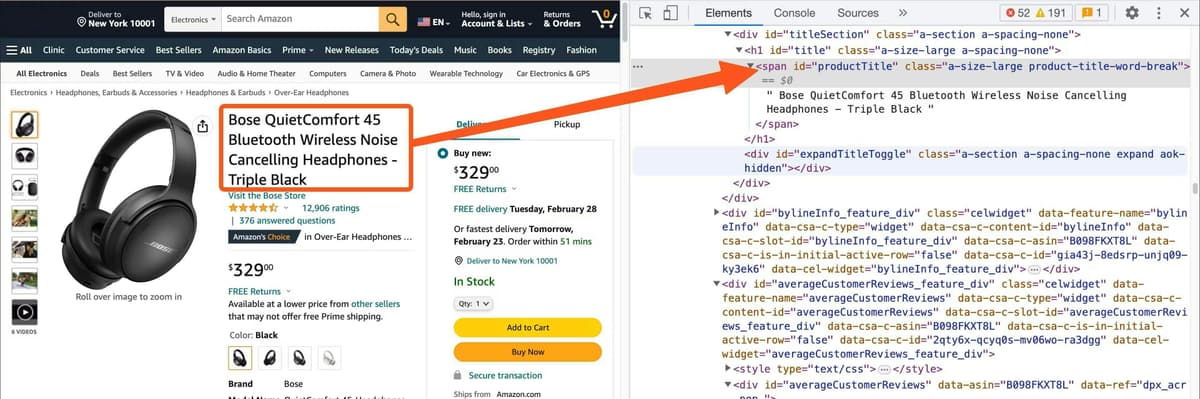
The title is wrapped in an element with the unique ID #productTitle.
Next, right-click on the price and click Inspect:
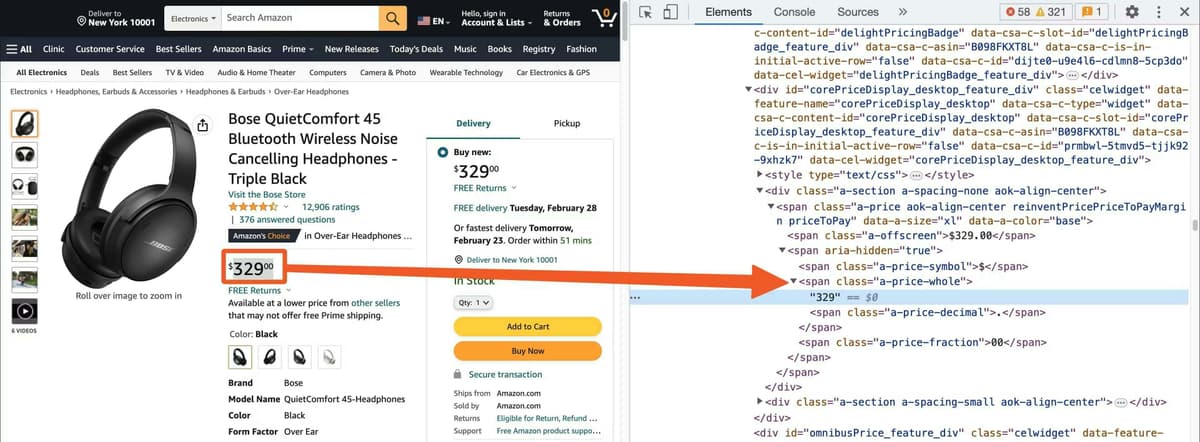
Step 4: The Python Extraction Script
Here is a clean script that extracts the core attributes for any Amazon product:
import requests
from bs4 import BeautifulSoup

headers = {
    'User-Agent': 'Mozilla/5.0 (Windows NT 10.0; Win64; x64) AppleWebKit/537.36 (KHTML, like Gecko) Chrome/126.0.0.0 Safari/537.36',
    'Accept-Language': 'en-US,en;q=0.9',
    'Accept': 'text/html,application/xhtml+xml,application/xml;q=0.9,*/*;q=0.8',
}

def scrape_amazon_product(url):
    response = requests.get(url, headers=headers, timeout=15)

    if response.status_code != 200:
        print(f"Failed to fetch page. Status code: {response.status_code}")
        return None

    soup = BeautifulSoup(response.text, 'html.parser')

    # 1. Product Title
    title_el = soup.select_one('#productTitle')
    title = title_el.text.strip() if title_el else "N/A"

    # 2. Product Price
    price_el = soup.select_one('.a-price .a-offscreen')
    price = price_el.text.strip() if price_el else "N/A"

    # 3. Rating
    rating_el = soup.select_one('#acrPopover')
    rating = rating_el.get('title') if rating_el else "N/A"

    # 4. Main Product Image
    img_el = soup.select_one('#landingImage')
    image_url = img_el.get('src') if img_el else "N/A"

    return {
        "title": title,
        "price": price,
        "rating": rating,
        "image_url": image_url
    }

# Test with a sample product URL
product = scrape_amazon_product("https://www.amazon.com/dp/B0C3HCD34R")
print(product)Extracted Structured Output:
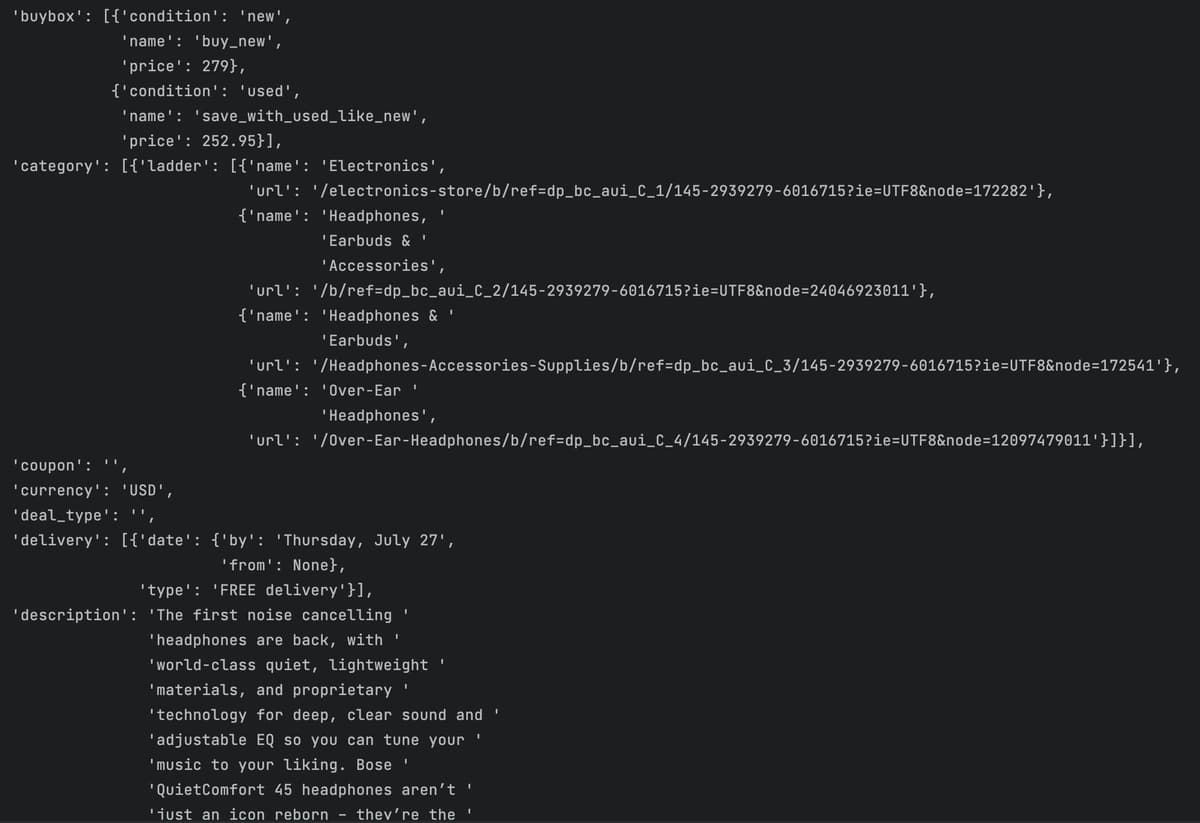
Step 5: Scraping Search Result Pages & Multiple Products
To scrape an entire category or keyword search, target the search result cards. Each organic product card is wrapped inside div[data-component-type="s-search-result"]:
import requests
from bs4 import BeautifulSoup
import pandas as pd

def scrape_search_results(keyword):
    search_url = f"https://www.amazon.com/s?k={keyword}"
    response = requests.get(search_url, headers=headers)
    soup = BeautifulSoup(response.text, 'html.parser')

    items = []
    for card in soup.select('div[data-component-type="s-search-result"]'):
        asin = card.get('data-asin')
        title_el = card.select_one('h2 a span') or card.select_one('h2')
        price_el = card.select_one('.a-price .a-offscreen')

        if asin and title_el:
            items.append({
                "asin": asin,
                "title": title_el.text.strip(),
                "price": price_el.text.strip() if price_el else "N/A"
            })

    df = pd.DataFrame(items)
    df.to_csv("amazon_search_results.csv", index=False)
    print(f"[+] Saved {len(items)} products to amazon_search_results.csv")
    return items

scrape_search_results("over ear headphones")3. The Scale Problem: Why Simple Scripts Stop Working
The basic script works well for 10 or 20 products from your local computer. But when you attempt to harvest hundreds or thousands of products, you hit Amazon's anti-bot defenses:
-
The Robot Check CAPTCHA Wall
After 30–50 requests from a single IP, Amazon stops serving product pages and returns: 'Type the characters you see in this image'.
-
Datacenter Proxies Are Blocked on Request #1
Cheap datacenter server IPs (AWS, DigitalOcean, Hetzner) are recognized by AWS WAF immediately. Entire hosting subnets are dropped before HTML renders.
-
Pay-Per-GB Residential Proxies Drain Your Budget
Amazon detail pages are heavy (2 MB to 4 MB per page). Scraping 50,000 products consumes 150+ GB of bandwidth. At residential rates of $4–$8 per GB, you spend $600 to $1,200 on proxy bills for a single crawl.
4. The Solution: 4G/5G Mobile Proxies & Instant IP Rotation
The industry standard for large-scale Amazon scraping is routing requests through dedicated 4G/5G mobile proxies:
- Carrier-Grade NAT (CGNAT) Immunity — Mobile carriers share a single public IPv4 exit address among thousands of real smartphone users. Amazon cannot block a mobile IP without accidentally locking out thousands of legitimate shoppers on the Amazon mobile app.
- Instant IP Rotation via API — When Amazon returns an anti-bot hurdle, send an automated GET request to the PXM2 rotation webhook. Your cellular modem establishes a fresh public IP within 8 seconds and your script resumes scraping immediately.
- Unmetered Flat-Rate Bandwidth — PXM2 mobile proxies include unlimited data on dedicated 4G/5G modems — no surprise per-gigabyte overage invoices.
Adding Rotating Mobile Proxies to Your Python Script
import requests
import time

# 1. PXM2 Mobile Proxy Credentials
PROXIES = {
    "http": "http://username:password@proxy.pxm2.io:1080",
    "https": "http://username:password@proxy.pxm2.io:1080",
}

# 2. PXM2 Instant IP Rotation API Webhook
ROTATION_URL = "https://api.pxm2.io/v1/rotate?key=YOUR_API_KEY"

def rotate_mobile_ip():
    """Cycle the cellular carrier IP when Amazon serves a CAPTCHA or 503."""
    print("[*] Bot block detected. Triggering mobile IP change...")
    requests.get(ROTATION_URL, timeout=10)
    time.sleep(8)  # Allow modem to renegotiate radio connection
    print("[+] Fresh cellular IP acquired!")

def fetch_product_safe(url):
    session = requests.Session()
    session.proxies = PROXIES
    session.headers.update(headers)

    for attempt in range(3):
        res = session.get(url, timeout=15)

        # Check for CAPTCHA or rate limits
        if res.status_code == 503 or "Robot Check" in res.text:
            rotate_mobile_ip()
            continue

        if res.status_code == 200:
            return res.text

return NoneGet a Mobile Proxy for Amazon Scraping
Live PXM2 locations — pick the country whose Amazon marketplace you want to scrape, and get a dedicated 4G/5G IP with unlimited bandwidth and rotations:
France
India
Poland
Frequently Asked Questions
Is scraping products on Amazon legal?
Yes. Extracting publicly available product data (titles, prices, ratings, availability) is legal in the US and EU, as reinforced by rulings like hiQ Labs v. LinkedIn. Scrapers must access public storefronts without logging in, avoid copyrighted images or personal identifiable data (PII), and maintain polite request cadences.
Which is better for Amazon scraping: a VPN or a proxy?
A dedicated rotating mobile proxy is far superior. VPNs route all machine traffic through a single static IP address and cannot be programmatically rotated. Mobile proxies support script-level authentication, multi-threaded pipelines, and automated IP rotation via webhook.
How do I bypass Amazon’s "Type the characters you see in this image" CAPTCHA?
Do not waste time with third-party image CAPTCHA solvers. Solving an Amazon CAPTCHA takes 15+ seconds and often re-triggers immediately. The industry standard is event-driven IP rotation: when your scraper detects a 503 or robot check page, call the PXM2 rotation webhook, acquire a fresh cellular IP in 8 seconds, and resume requests.
Why do search result cards sometimes have missing prices?
Amazon customizes server-rendered HTML by IP geolocation. Browsing Amazon.com from outside the US hides pricing for items that cannot be shipped internationally. Use a US mobile proxy matching the marketplace or supply a US postal code cookie.
Do I need Playwright or Selenium to scrape Amazon products?
Not for core product details. Titles, prices, star ratings, and availability are delivered in initial server-rendered HTML. Python requests and BeautifulSoup are 10x faster and consume 90% less memory than headless browsers. You only need Playwright for dynamic variant clicks or interactive components.
How many requests can I send per minute on a mobile proxy?
A single dedicated 4G/5G modem handles 20–30 requests per minute with 1 to 2 seconds of randomized jitter. For higher throughput, distribute requests across a pooled multi-modem array from PXM2.
Related Mobile Proxy Guides
Explore more technical guides in the PXM2 scraping and browser automation cluster:
Scrape Amazon Products Without IP Bans
Dedicated 4G/5G cellular modems with native carrier IPs, 8-second webhook rotation, and unlimited flat-rate bandwidth for heavy product catalogues.
Start Free Mobile Proxy Amazon Scraping Now →