How to Set Up Mobile Proxies in Linken Sphere: Step-by-Step Guide
Master Linken Sphere multi-accounting: SOCKS5 configuration, Smart Session GeoIP auto-matching, 1-click remote IP rotation URLs, and bypassing anti-fraud detection in 2026.
- Smart Session auto-matching — dynamically aligns system timezone, geographic coordinates, WebRTC public IP, and browser locale with proxy egress node.
- 1-click remote IP rotation — paste PXM2 rotation webhook directly into Proxy Manager to cycle cellular IPs from the browser toolbar in seconds.
- SOCKS5 UDP & DNS integrity — routes WebRTC voice/video and DNS requests through dedicated cellular modems, eliminating local computer IP leaks.
- Hardware noise injection — alters Canvas 2D, WebGL shaders, and AudioContext at the kernel level without leaving detectable JavaScript wrapper footprints.
What Is Linken Sphere & Anti-Detect Architecture
Linken Sphere is an advanced anti-detect browser built for professional multi-accounting, e-commerce account scaling, social media automation, and ad arbitrage. Rather than merely masking headers or overriding JavaScript variables, Linken Sphere rebuilds the Chromium rendering engine to alter hardware canvas contexts, audio waveforms, WebGL shaders, and device fonts at the kernel execution layer.
However, even the most sophisticated anti-detect browser is vulnerable if paired with low-grade datacenter or residential proxy pools. Modern anti-fraud systems like Cloudflare, DataDome, Akamai, and perimeter firewalls immediately flag datacenter Autonomous System Numbers (ASNs) and mismatched network characteristics. Pairing Linken Sphere with PXM2 dedicated 4G/5G mobile proxies delivers genuine Carrier Grade NAT (CGNAT) cellular trust, ensuring your profiles operate under the exact network identities of genuine smartphone consumers.
Architecture
How Linken Sphere Smart Sessions Prevent Fingerprint Mismatches
The primary pitfall in multi-accounting is parameter inconsistency: for instance, a browser session configured with a London timezone connecting through an IP located in Dallas, Texas, or reporting Italian language headers over a Japanese carrier network.
Linken Sphere's Smart Session engine solves this autonomously. When you bind a proxy, the browser executes a pre-flight GeoIP lookup against enterprise geolocation databases. It immediately extracts the exact city, coordinates, system timezone, currency, and locale of the proxy egress node, synchronizing all corresponding browser parameters before a single webpage request is dispatched.
Proxy Protocol Selection: SOCKS5 vs HTTP for Anti-Detect Browsing
Linken Sphere natively supports HTTP, HTTPS, SOCKS5, and SSH proxy connections. When configuring mobile proxies for multi-accounting, understanding protocol mechanics is essential:
| Protocol Feature | SOCKS5 (Recommended) | HTTP / HTTPS Proxy | Impact on Anti-Detect Stealth |
|---|---|---|---|
| Transport Layer | Layer 5 (TCP & UDP data) | Layer 7 (Application HTTP) | SOCKS5 handles all protocol types |
| WebRTC Audio/Video Traffic | Full UDP proxying support | Bypasses proxy / Leaks IP | SOCKS5 prevents WebRTC IP leaks |
| DNS Resolution Routing | Remote DNS at proxy exit node | Handled via CONNECT or local | SOCKS5 guarantees remote DNS matching |
| Authentication | RFC 1928 Username/Password | Proxy-Authorization Header | Zero header alteration in SOCKS5 |
For optimal anonymity in Linken Sphere, always select SOCKS5 when configuring PXM2 mobile proxies. SOCKS5 ensures that WebRTC UDP datagrams and DNS queries are routed directly through your cellular modem rather than exposing your local computer's ISP.
Step-by-Step: Adding Proxies in Linken Sphere Proxy Manager
Linken Sphere provides a dedicated centralized Proxy Manager where you can store, test, tag, and assign proxy connections across unlimited browser sessions.
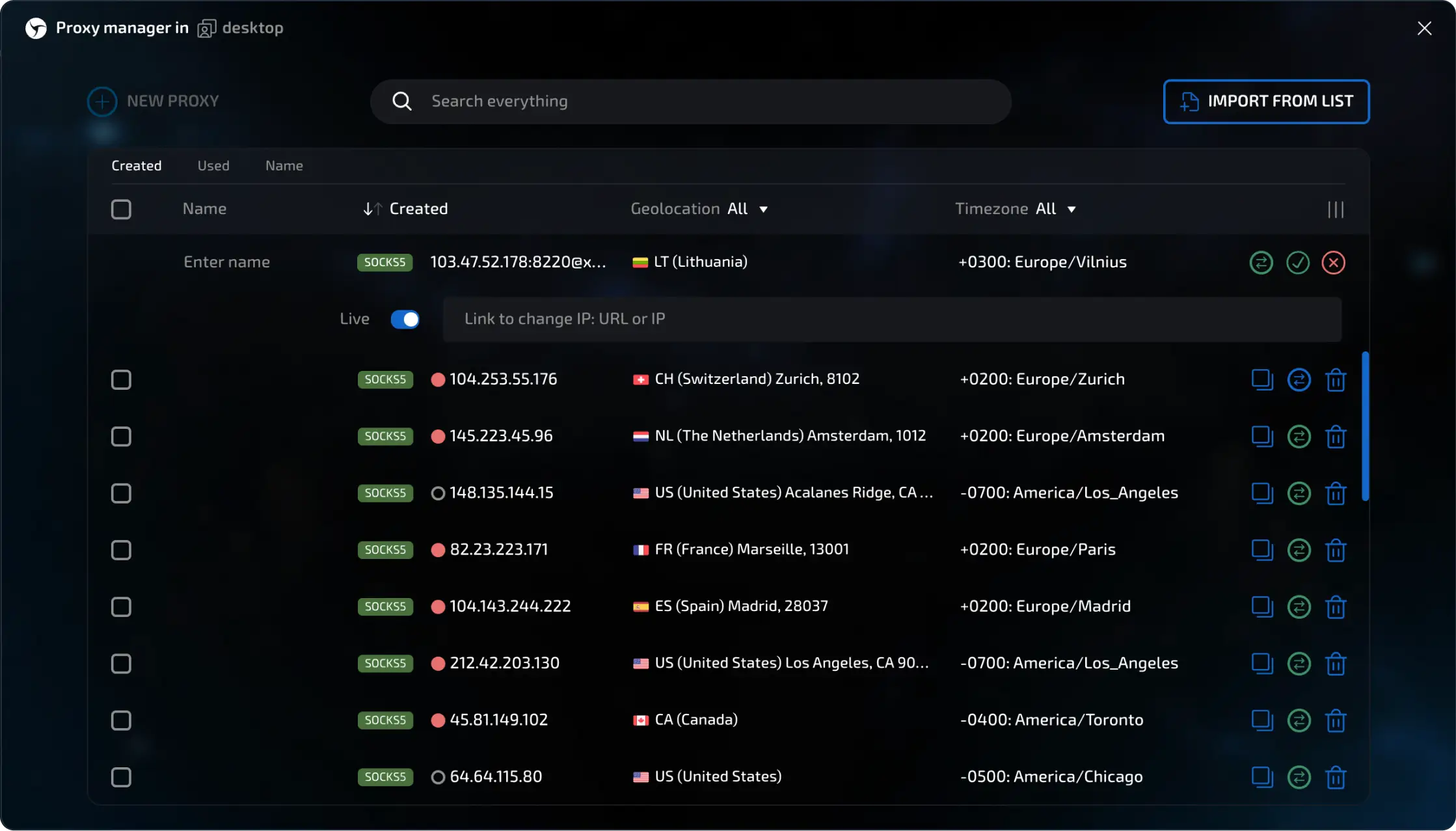
Follow this 4-step walkthrough to bind your PXM2 mobile proxy:
-
Open Proxy Manager & Click Add Proxy
Launch Linken Sphere on macOS, Windows, or Linux. In the top navigation bar or left sidebar, navigate to the Proxy Manager icon and click the blue [+ Add Proxy] button.
-
Select Protocol & Enter PXM2 Server Credentials
In the New Proxy Configuration modal, choose SOCKS5. Copy your connection credentials from your PXM2 dashboard:
PXM2 Mobile Proxy FormatHost: gate.pxm2.io Port: 30001 Protocol: SOCKS5 Username: pxm2_user_1029 Password: your_password_hereAvailable in both SOCKS5 and HTTP protocols with dedicated throughput. -
Configure the Change IP URL (PXM2 1-Click Rotation Link)
Linken Sphere features a dedicated 'Change IP URL' field. Paste your PXM2 rotation webhook link here. When this link is populated, Linken Sphere adds an instant 'Rotate IP' button to the session toolbar and proxy table.
PXM2 IP Rotation Webhookhttps://pxm2.io/api/v1/rotate/1029/Sends an instant command to the physical 4G/5G cellular modem to re-attach to the tower. -
Run Built-In Verification & Save
Click the [Check Proxy] button at the bottom of the modal. Linken Sphere will execute an immediate handshake, validating latency, country flag, ISP name (e.g. T-Mobile USA, Vodafone, Orange), and exit IP. Once the green ACTIVE indicator lights up, click [Save].
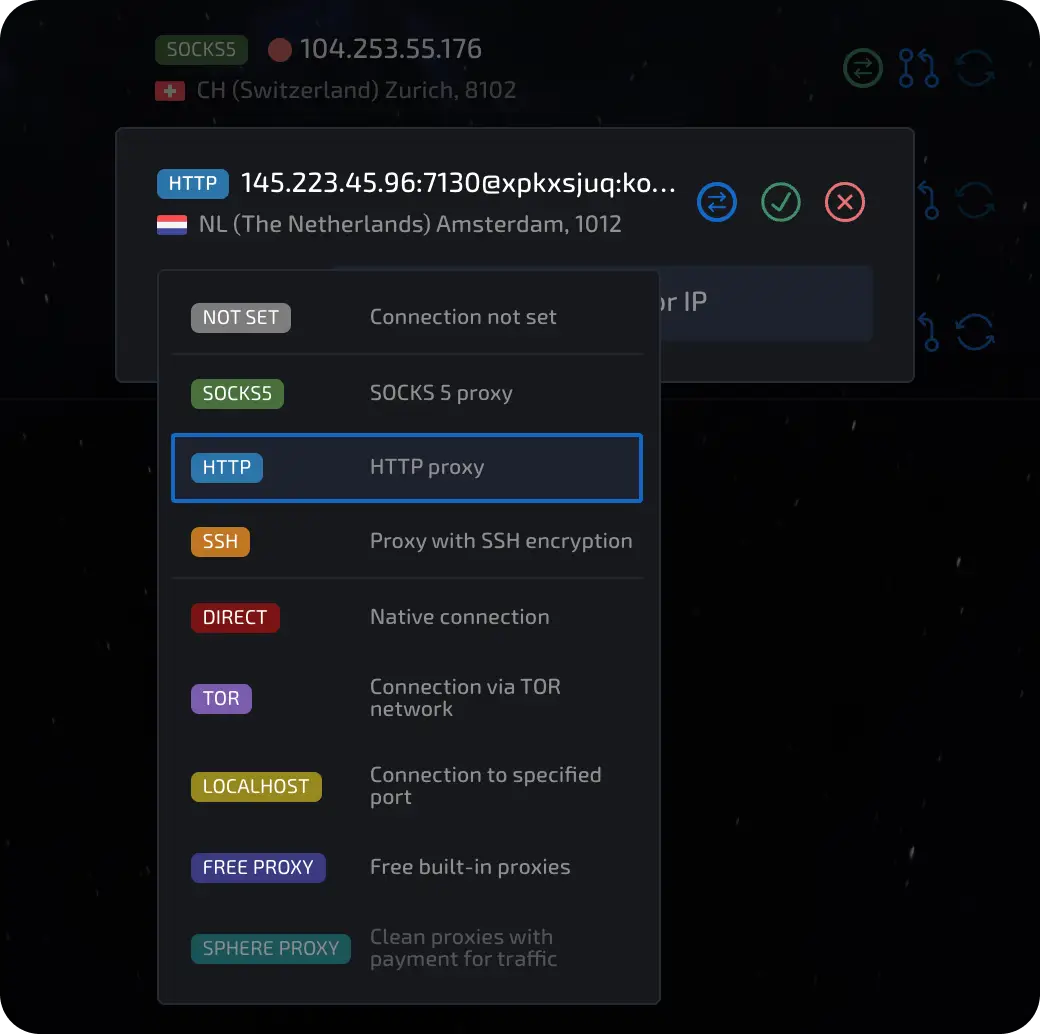
Smart Session Setup & Automatic GeoIP Synchronization
Once your proxies are saved in Proxy Manager, creating anti-detect browser profiles takes only seconds using Linken Sphere's Smart Session technology.
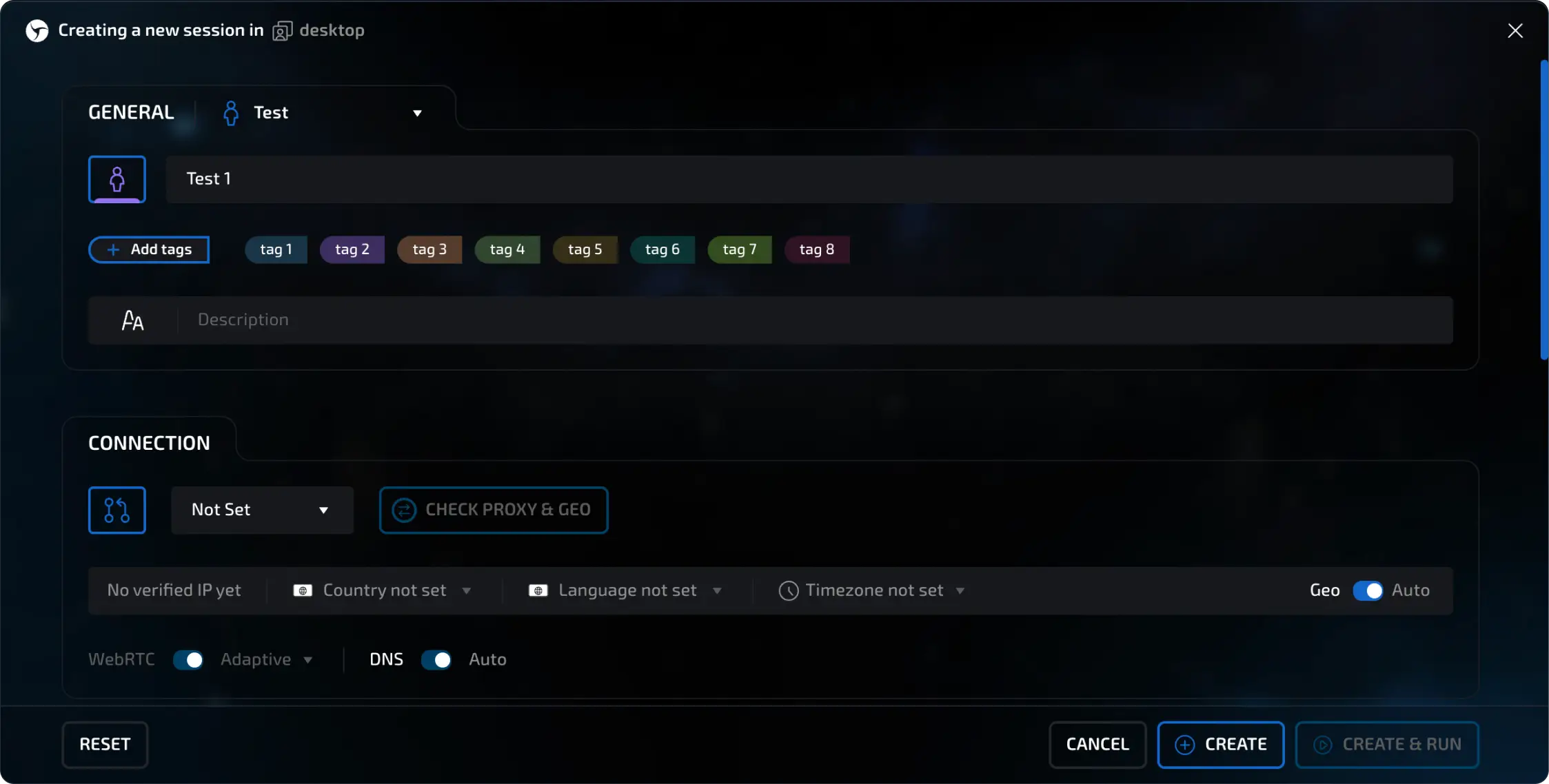
When creating a new profile:
- Profile Mode: Select 'Smart Session'. This activates dynamic hardware noise injection and automatic geolocation alignment.
- Proxy Binding: Choose your configured PXM2 mobile proxy from the dropdown. The live exit IP and carrier ASN will appear immediately.
- Hardware Noise Injection: Linken Sphere automatically introduces subtle, cryptographically deterministic noise into Canvas 2D, WebGL shaders, AudioContext, and client rects. This prevents anti-fraud scripts from generating matching cross-session hash fingerprints while remaining undetectable to biometric scanners.
- Timezone & WebRTC Spoofing: The browser sets the exact timezone offset matching your mobile carrier's tower location and configures WebRTC to broadcast only your mobile proxy IP, eliminating local LAN IP exposure.
Stealth Mechanics
Why PXM2 Cellular CGNAT Guarantees Zero Subnet Bans in Linken Sphere
Datacenter proxy providers purchase blocks of sequential IP addresses in hosting facilities (e.g. AWS, OVH, Hetzner). Anti-bot firewalls detect repetitive patterns across these subnets and ban entire /24 blocks (256 IPs) at once.
PXM2 operates dedicated hardware modems connected to Tier-1 mobile carriers (Verizon, AT&T, Vodafone, O2, Orange). Cellular carriers utilize Carrier Grade NAT (CGNAT), where thousands of legitimate consumer smartphones share each public IP pool. Anti-bot engines cannot ban a mobile CGNAT IP without blocking thousands of real mobile customers.
1-Click Mobile IP Rotation Setup via PXM2 API
One of the standout features of Linken Sphere is seamless integration with remote proxy rotation links. When managing multiple accounts, switching between accounts without cycling your cellular IP leaves a traceable link between sessions.

How the rotation flow works:
-
Click Rotate IP in Session Toolbar
In any open session window or within Proxy Manager, click the [Rotate IP] circular arrow icon.
-
Hardware Modem Disconnect & Reconnect
PXM2's server issues an AT command to the dedicated cellular modem, causing it to cycle flight mode or disconnect from the cellular tower. The mobile carrier allocates a fresh, clean mobile IP from its CGNAT pool within 5 to 10 seconds.
-
Automatic Profile Re-Alignment
Linken Sphere detects the IP transition, fetches the updated geolocation metadata, and re-syncs the session's WebRTC and system clock without requiring a browser restart.
Bulk Proxy Import for High-Volume Multi-Accounting
If you run dozens of profiles for team collaboration or automated campaigns, you can import multiple PXM2 proxies simultaneously. In Proxy Manager, click [Bulk Import] and paste your proxy list using standard formats:
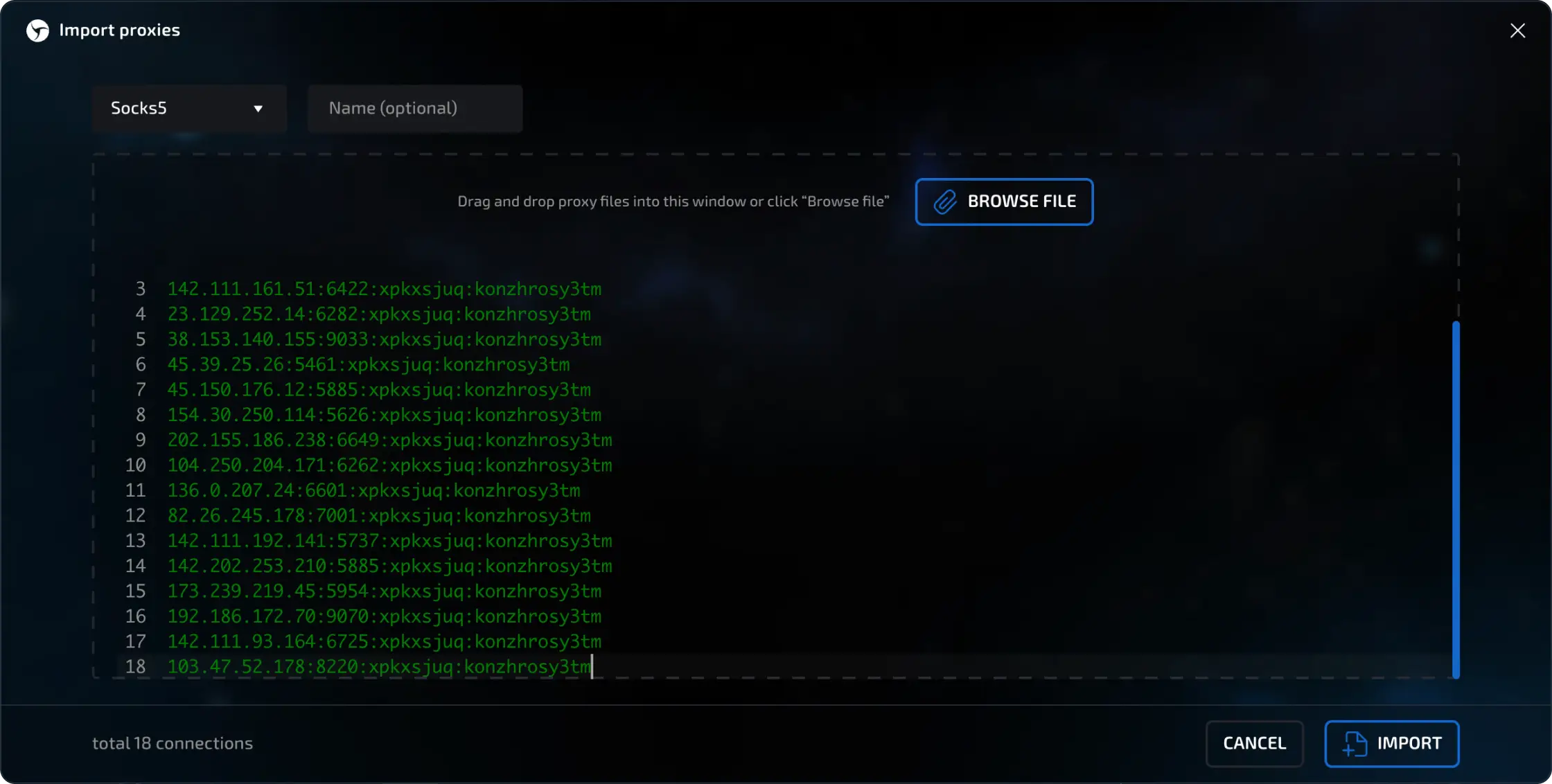
# Standard Format (Host:Port:Username:Password)
gate.pxm2.io:30001:pxm2_user_1029:secret_pass_123

# URL Format with Protocol and Rotation Link
socks5://pxm2_user_1029:secret_pass_123@gate.pxm2.io:30001[https://pxm2.io/api/v1/rotate/1029/]
socks5://pxm2_user_1030:secret_pass_456@gate.pxm2.io:30002[https://pxm2.io/api/v1/rotate/1030/]

# HTTP Protocol Variant
http://pxm2_user_1031:secret_pass_789@gate.pxm2.io:30003[https://pxm2.io/api/v1/rotate/1031/]Verification & Fingerprint Leak Testing
Before logging into valuable social media or e-commerce accounts, always verify that your session exhibits zero identity leaks. Open your new Linken Sphere session and visit these verification benchmarks:
| Benchmark Site | What to Verify | Expected Result with PXM2 + Linken Sphere |
|---|---|---|
| iphey.com | Browser fingerprint & IP reputation | Trustworthy (100% Score) |
| browserleaks.com/webrtc | WebRTC IP leaks & STUN requests | Only mobile proxy IP shown; 0 LAN leaks |
| pixelscan.net | Hardware consistency & fingerprint anomalies | Clean device; zero automation flags |
| coveryourtracks.eff.org | Tracker resistance & canvas uniqueness | Randomized unique hardware profile |
Anti-Detect Benchmark: Linken Sphere + Mobile Proxies vs Generic Setups
We tested common multi-accounting setups against rigorous enterprise bot-detection firewalls. Here is how Linken Sphere paired with PXM2 mobile proxies performs:
| Setup Combination | Device Fingerprint | IP ASN Trust | Cloudflare Turnstile | Account Survival Rate |
|---|---|---|---|---|
| Stock Chrome + Datacenter Proxy | Identical Hardware | Hosting / Datacenter | Instant CAPTCHA | 12% (Banned fast) |
| Free Anti-Detect + Residential Proxy | Basic JS Spoofing | Shared Residential | 55% Pass Rate | 64% Stability |
| Linken Sphere + Datacenter Proxy | Kernel-Level Spoofing | Hosting / ASN Flag | 68% Pass Rate | 71% Stability |
| Linken Sphere + PXM2 4G/5G Mobile | Smart Session Engine | Tier-1 Cellular Carrier | 99.2% First-Pass | 99.6% Long-Term |
Frequently Asked Questions
What is Linken Sphere and why is it preferred for multi-accounting?
Linken Sphere is an enterprise anti-detect browser built on a custom Chromium core. It isolates browser sessions with distinct hardware profiles, cookies, and network interfaces, preventing cross-account correlation on strict platforms like Facebook, Google, TikTok, and Amazon.
Should I configure SOCKS5 or HTTP proxies in Linken Sphere?
SOCKS5 is strongly recommended. Unlike standard HTTP proxies, SOCKS5 operates at Layer 5 and supports both TCP and UDP traffic. This enables Linken Sphere to proxy WebRTC audio/video datagrams and remote DNS queries through your mobile proxy, preventing local IP leaks.
How does the PXM2 1-click IP rotation link work in Linken Sphere?
When you paste your PXM2 rotation URL (e.g. https://pxm2.io/api/v1/rotate/<userproxy_id>/) into the "Change IP URL" field in Proxy Manager, Linken Sphere adds a dynamic rotation button to the browser toolbar. Clicking it triggers an instant modem reconnect command, cycling your mobile IP in 5-10 seconds.
What does Linken Sphere Smart Session do automatically?
Smart Session performs a pre-flight GeoIP query on your proxy egress IP and automatically configures the profile’s operating system timezone, geolocation coordinates, Accept-Language headers, and WebRTC public IP to match, eliminating the identity mismatches that trigger anti-bot flags.
Why should I use 4G/5G mobile proxies instead of residential or datacenter proxies?
Datacenter IPs belong to hosting subnets that anti-bot firewalls easily identify and ban in blocks. Mobile proxies route through physical carrier modems using Carrier Grade NAT (CGNAT), where thousands of genuine mobile users share each IP pool, giving your profiles the highest possible trust score.
Can I import multiple proxies at once into Linken Sphere?
Yes. Linken Sphere Proxy Manager includes a Bulk Import tool that supports standard formats like host:port:user:pass as well as URI syntax with protocol and rotation link: socks5://user:pass@host:port[https://pxm2.io/api/v1/rotate/<id>/].
Related Developer Resources
Power Linken Sphere with Dedicated PXM2 4G/5G Proxies
Equip your multi-accounting operations with dedicated cellular modems, automated 1-click IP rotation links, and zero bandwidth caps across 50+ tier-1 mobile carrier locations.
Get Dedicated Mobile Proxies